The WireBox binder will also be injected with 3 methods that will allow you to talk to your system environment or Java system properties. This will help you with container based applications or applications that rely on environment settings/secrets.
getEnv( key, [defaultValue] ) - Get a Java system environment value
getSystemProperty( key, [defaultValue] ) - Get a Java system property value
getSystemSetting( key, [defaultValue] ) - This method will retrieve a key from the Java system properties and if it does not exist, then it checks the system environment.
Custom DSL
WireBox allows you to create your own DSL object builders and then register them via your configuration binder. This allows you to create a namespace or override an internal namespace with your own object builder. By now we have seen our injection DSL and noticed that we have internal namespaces. With this feature we can alter it or create new ones so our annotations and injection DSLs can be customized to satisfaction. This is easily done in the following process
Create a CFC that implements wirebox.system.ioc.dsl.IDSLBuilder
Register your custom DSL builder in your configuration binder
Custom Scopes
WireBox allows you to create your own object persistence scopes so you can have full control on their lifecycle. This is easily done in the following process:
Create a CFC that implements wirebox.system.ioc.scopes.IScope
Register your custom scope in your configuration binder
You can create your own persistence scope or if you are getting funky, override the internal persistence scopes with your own logic.
MapDirectory() Influence & Filters
The mapDirectory() allows you to leverage closures or lambdas to influence and filter mappings. The arguments are filter to add a filter that MUST return boolean in order to process the mapping and influence that can influence the created mapping with any custom bindings.
// influence only certain components to be singleton
mapDirectory(packagePath="coldbox.testing.testModel.ioc", influence=function(binder, path){
if( findNoCase( "simple", arguments.path) ){
arguments.binder.asSingleton();
}
});
// filter some components from registration
mapDirectory(packagePath="coldbox.testing.testModel.ioc", filter=function(path){
return ( findNoCase( "simple", arguments.path ) ? false : true );
});
Java Namespace
You can also request Java objects from the injection dsl.
In all reality we could be building our objects and its dependencies, object graph, without any configuration just plain location and implicit conventions. This is great but not very flexible for refactoring, so let's do the best practice of defining a mapping or an alias to a real object.
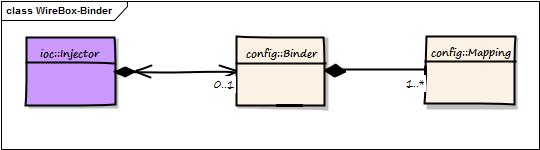
We do this by creating a WireBox configuration binder wirebox.system.ioc.config.Binder, which is a simple CFC that defines the way WireBox behaves and defines object mappings. This binder is then used to initialize WireBox so it has knowledge of these mappings and our settings.
The Binder is also the way you configure WireBox for operation.
ColdBox Enhanced Binder
If you are using your configuration binder within a ColdBox application you will have some extra goodies in the Binder that come in very handy:
getColdBox() : Retrieve the instance of the running ColdBox application
getAppMapping() : Get the current AppMapping, the location of the application on th server, setting for the running ColdBox application
Mapping DSL
The mapping DSL is the way to configure object mappings in WireBox that will represent objects, factories or providers. All mappings DSL methods return back an instance of the binder so you can concatenate methods to create readable execution chains.
The chains are divided into three types:
Initiators - Start the mapping DSL process
Modifiers - Can modify a mapping with metadata and behavior
Destinations - Tells the binder to what object or behavior we should map to.
If a mapping does not have a destination, then the information stored in the chain can bleed into other mappings.
Processing Mappings
Since version 5.5.0 all mappings in WireBox will only be processed when they are requested for the very first time. This is to enhance performance and increase startup times. Processing means that the object's and its inheritance trail are inspected for metadata, which can be a very time consuming process.
process()
However, you can explicitly process a mapping right after mapping it via the binder's process() method.
mapPath( "com.app.Service" ).process();
That's it! If you call the process() method right after a mapping, it will be automatically processed. This means all annotations will be inspected.
mapDirectory( process=true )
If you are mapping using mapDirectory() then you can pass the process argument to true and all mappings in that directory scan will be processed automatically.
What's New With 8.1.0
April 14, 2026
You can read all about this release on our main What's New Page:
Release Notes
The full release notes per library can be found below. Just click on the library tab and explore their release notes:
Upgrading to WireBox 8
The official WireBox 8 upgrade guide
An upgrade from WireBox 7 should not incur any breaking changes, but you should still read through the guide to ensure you are not using any deprecated or removed features.
ColdFusion 2018-2021 Support Dropped
ColdFusion 2018-2021 support has been dropped. Adobe doesn't support them anymore, so neither do we.
What's New With 8.0.0
Discover the power of WireBox 8.0.0
🎉 Welcome to WireBox 8.0.0 - this release focuses on WireBox, CacheBox, and LogBox updates that ship as part of the ColdBox platform. Below is a focused summary of the changes relevant to this documentation set.
🚀 Major Highlights
WireBox - BoxLang Prime support and key binder cleanups
Eager Init
Another aspect of our objects is when are they created? Good question!
By default all objects are created ONLY when they are requested, in other words they are lazy created. But what if you are spoiled and you want your stuff NOW NOW NOW! Well, you can, cry if you want to! Just tell WireBox that you want your objects to be eagerly created via the mapping DSL asEagerInit() function or a eagerInit annotation on the component.
Binder Configuration Properties
Whether you use WireBox standalone or within a ColdBox context, a Binder gets a structure of configuration properties so it can use them whenever you are configuring it or declaring mappings. If you are in standalone mode, the Injector can be constructed with a properties structure that will be passed to the binder for usage.
If you are in a ColdBox application, the ColdBox application configuration structure is passed to you.
You can then use these properties with the following methods in your Binder:
Types & Scopes
Each configuration binder has two public properties accessible in the this scope:
this.TYPES : A reference to wirebox.system.ioc.Types used to declare what type of object you are registering for construction or wiring
Influence Instances at Runtime
You can use our mapping DSL to register influence closures or lambdas on a per mapping basis. This will allow a developer to influence the requested instance of any object/data element and decorate objects or even return different objects.
This is similar to object providers but instead of overriding the ENTIRE creation process of the object like a provider does, the user might want to simply influence the creation of a normal mapping with some additional flair. This is accomplished via the withInfluence mapping DSL function. It receives a closure as an argument and the closure has the following signature:
Here is an example of adding some nice pizzazz to an object:
In this instance, the instance is already built and then passed into the closure for additional influence. Please note, that the object is returned from the closure. You can make this optional, but if something IS returned, it will override the instance which will allow a developer to replace or decorate the instance as they see fit.
Parent Object Definitions
Thanks to Phill Nacelli, you can reuse object definitions in your binder or via annotations. This means that you can declare an object with its dependencies and then create other definitions that use all of this parent object's definitions. This saves tons of time in declarations and provides you with great reusability.
Here is a small example:
WireBox Injector
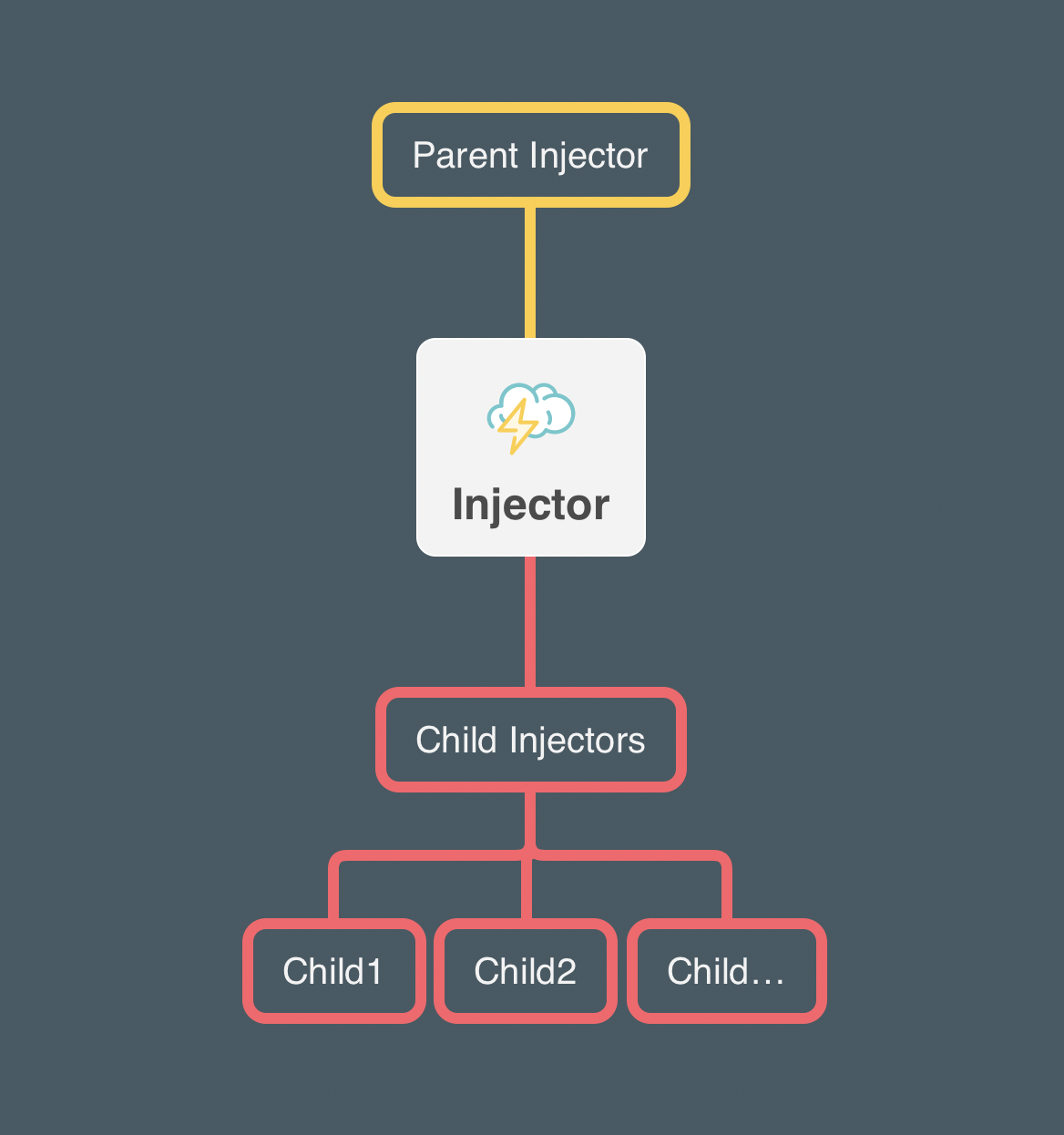
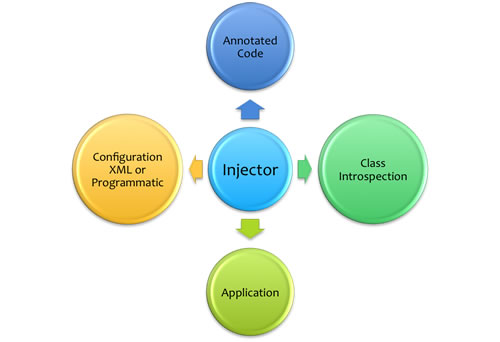
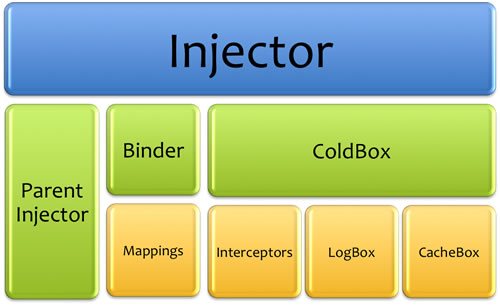
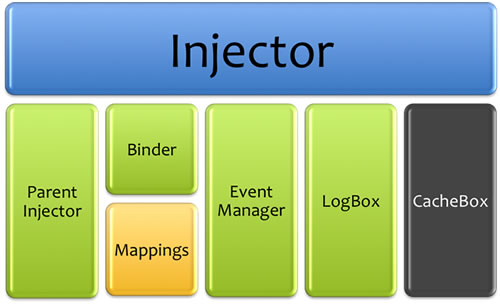
WireBox bases itself on the idea of creating object injectors (wirebox.system.ioc.Injector) that in turn will produce and wire all your objects. You can create as many injector instances as you like in your applications, each with configurable differences or be linked hierarchically by setting each other as parent injectors.
Each injector can be configured with a configuration binder or none at all. If you are a purely annotations based kind of developer and don't mind requesting pathed components by convention, then you can use the no-configuration approach and not even have a single configuration file, all using autowiring and discovery of conventions. However, if you would like to alter the behavior of the injector and also create object mappings, you will need a configuration binder. The next section explains the way to create this configuration binder, below is how to startup or bootstrap the injector in different manners:
No Configuration Binder:
With a Configuration Binder:
Introduction
WireBox is an enterprise ColdFusion Dependency Injection and Aspect Oriented Programing (AOP) framework
WireBox Manual - Version 7.x
WireBox is an enterprise ColdFusion Dependency Injection and Aspect Oriented Programing (AOP) framework. WireBox's inspiration has been based on the idea of rapid workflows when building object oriented ColdFusion applications, programmatic configurations and simplicity. With that motivation we introduced dependency injection by annotations and conventions, which has been the core foundation of WireBox. We have definitely been influenced by great DI projects like Google Guice, Grails Framework, Spring and ColdSpring so we thank them for their contributions and inspiration
WireBox is standalone framework for ColdFusion (CFML) applications and it is also bundled with the ColdBox Platform.
Injection Idioms
Now that we have constructed our injector let's discuss a little about injection idioms or styles WireBox offers before we go all cowboy and start configuring and using this puppy. The styles shown below are written in execution order.
Constructor (1)
Motivation: Mandatory dependencies for object creation
Each constructor argument receives a inject annotation with its required injection DSL. Be careful when dealing with object circular dependencies as they will fail via constructor injection due to its chicken and the egg nature
EntityService Namespace
In order to use this namespace you will need the cborm module installed in your application: install cborm
Gives you the ability to easily inject base ORM services or binded virtual entity services for you:
Persistence Annotations
The following annotations can be placed in the component declaration to tell the WireBox injector where to persist the constructed object. If no scope annotations are found on the component or mappings then the object is treated as NO SCOPE or a prototype/transient object; one that gets constructed and discarded every time.
singleton - A singleton object that persists for the entire life-time of the application
scope="registered_scope"
CacheBox Annotations
If you would like to use CacheBox for persistence for you objects you will need to mark your CFC with the following annotation(s)
cachebox="[provider]" - The default provider is called 'default', so this annotation can be empty or a named cache provider
cache - Cache into the default provider, shorthand annotation, no value needed
Executor Namespace
The executor namespace is both available in ColdBox and WireBox standalone and it is used to get references to created asynchronous executor thread pools.
Mapping Extra Attributes
You can store a-la-carte attributes in a specific mapping so it can be retrieved at a later time by either an AOP aspect or Events. This is a great way to store custom metadata about an object so it can be read later for some meaningful purpose. Let's say you want to tag a mapping with a custom type that is not so easily determined from the object instance itself. You don't want to do all kinds of introspection in order to know what object you received in an aspect or an event.
This mapping declares that an object has some extra attributes that will be stored in the mapping, such as the location and if it belongs to a module. This is then incredibly useful when you have an attached listener to WireBox:
As you can see from this sample, the extra attributes are incredibly essential, as the listener just sends the target object. It would take lots of introspection and metadata inspections in order to determine certain metadata about an object. However, with the extra attributes, it is just a snap!
LogBox Namespace
This DSL namespace interacts with the loaded LogBox instance.
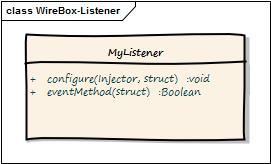
WireBox Listeners
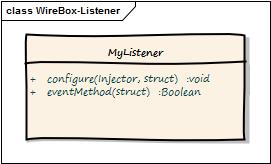
In our previous section, we have seen all the events WireBox announces, but how do we listen? There are two ways to build WireBox listeners because there are two modes of operation, but the core is the same.
Listeners are simple CFCs who must create methods that match the name of the event they want to listen to.
If you are running WireBox within a ColdBox application, listeners are and you declare them and register them the same way you do with normal interceptors.
Virtual Provider Injection DSL
You can inject automatic object providers by using the provider injection DSL namespace. This will inject a WireBox provider class (wirebox.system.ioc.Provider) that follows our with one method on it: get() that will provide you with the requested mapped object.
The difference between custom providers here is that WireBox will create a virtual provider object for you dynamically at runtime, configure it to retrieve a specific type of mapping and then use that for you. The provider namespace will take everything after it and evaluate it as either a named mapping or a full injection DSL string.
For example, inject="provider:MyService" will inject a provider of MyService objects, so it will look for a MyService
Providers
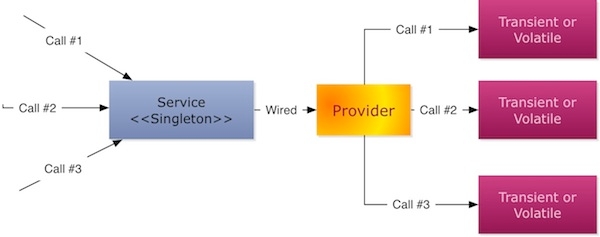
Let's get funky now! We have seen how to inject objects and how to scope objects. However, we need to talk about a cool WireBox feature called object providers. We learned that when you request an object from WireBox it creates it and injects it immediately. However, sometimes we need more control like:
Delay construction of the dependency until some point in time during your controlled execution. Maybe you don't want to construct some dependencies until some feature in your application is enabled.
You need multiple instances of a class. Like a User service producing transient users, or our espresso machine creating espressos.
toProvider() closures
The mapping destination toProvider() can also take a closure that will be executed whenever that mapping is requested. This allows you to add your own custom provider construction code inline without creating a standalone provider object that implements our provider interface. By leveraging closures you can really get funky and more concise in your coding. This closure will have the following signature and it must return the instance requested:
Here is an example of how to accomplish this:
Provider Namespace
Inject object providers, please refer to our in this guide.
Virtual Provider Mapping
You can also use our cool mapping DSL to create mappings that refer to provided objects by using the DSL construction type:
You can use the following mapping methods to map to virtual providers by using their dsl arguments:
mapDSL()
mapDSL()
Scope Widening Injection
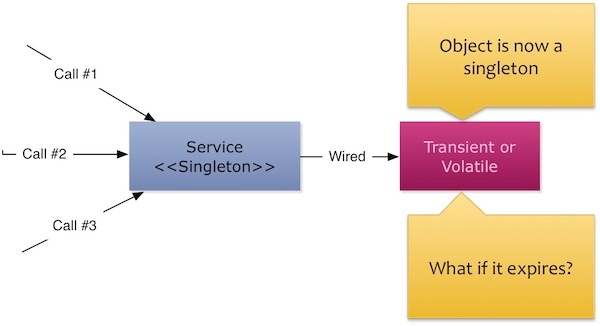
An object that is scoped into request, session, server, cachebox or application scopes and if wired into a persisted object will remain around even when this object has expired from the scope. This is called scope-widening injection and is a problem that must be addressed by NOT injecting them into persisted objects directly but by using WireBox's provider approach. This guarantees that the object's scope lifecycle will be maintained and your singleton or other persistent objects will be decoupled from the scope by accessing the target object via its provider.
For example, let's say you have a handler that wires in a user object that is scoped into session scope, but the handler itself is scoped as a singleton:
So when the handler is created and persisted as a singleton, the user object gets created, stored in session and also referenced into the lifecycle of the handler object. So now, if the user expires from session, the handler does not know about it, because all it knows it that a direct reference to that out of context object still remains. So if the user needed things in session to exist, this will now fail. This problem is much like how Hibernate and detached objects work. Objects are no longer in session, they are detached. This scope widening issue is resolved by NOT injecting the user object directly into the handler but by using a provider.
WireBox Object Populator
WireBox also comes packaged with our handy object populator that has been so successful in our ColdBox applications. The object populator object can populate objects with data from XML, JSON, WDDX, structures, queries and much more. So we highly encourage you to check it out as it will really help out in your applications.
The way to retrieve it is to use the getObjectPopulator() method on the injector and then call one of our populate methods on the object. You can also use the wirebox:populator injection DSL to retrieve it.
Virtual Inheritance
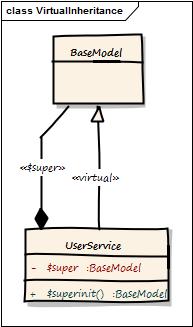
You can make two CFCs blend together simulating a virtual runtime inheritance with WireBox. WireBox will grab the target CFC and blend into it all of the virtual inheritance CFC's methods and properties. It will then also create a $super reference in the target and a $superinit() reference. This is a great alternative to real inheritance and allow for runtime mixins to occur. You start off by mapping the base or source CFC and then mapping the target CFC and declaring a virtualInheritance to the base or source CFC:
This will grab all methods and properties in the BaseModel CFC and mix them into the UserService, then create a virtual $super scope which will map to an instantiated instance of the BaseModel
Virtual Provider Lookup Methods
This is a feature where you can mark methods in your components with a special provider annotation so they can serve the objects you requested automatically for you. This is an amazing feature as it will take the original method signature and replace the method for you with one that will serve the provided objects for you automatically. How insane is that! You deserve some getting jiggy wit it (chapter 4) dancing!
Wow! That's it! Yep, just create an empty method signature and annotated with provider={mapping} and then WireBox will read these annotated methods and replace them for you at runtime so when you call etEspresso() it actually calls the WireBox injector and requests a new espresso instance and it returns it.
Caution Please note that the visibility of provided methods does not matter to WireBox. It can provide public, private, or packaged
Registering a Custom Scope
Now I can use the ortus scope in my mappings DSL and even my annotations, isn't that cool!
CacheBox - BoxLang Prime support and provider fixes
LogBox - BoxLang Prime support and new configuration options
📚 Documentation MCP Server
Connect AI assistants directly to these docs via the Model Context Protocol (MCP):
used to declare in what life cycle scope the object will be stored under
These two classes contain static public members in the this scope that facilitate the declaration of persistence scopes and construction types for object mappings. Both BoxLang (.bx) and CFML (.cfc) components are supported in all type declarations. Below are the valid enumerations for these two classes:
this.TYPES
CFC : Construction of a CFC
JAVA : Construction of a Java class
WEBSERVICE : Construction of a webservice object
RSS : Construction of an RSS feed
DSL : Construction by DSL string
CONSTANT : A constant value
FACTORY : Construction by factory method
PROVIDER : Construction by a provider object or closure
this.SCOPES
NOSCOPE : Transient objects
PROTOTYPE : Transient objects
SINGLETON : Objects constructed only once and stored in the injector
SESSION : ColdFusion session scoped based objects
APPLICATION : ColdFusion application scope based objects
REQUEST : ColdFusion request scope based objects
SERVER : ColdFusion server scope based objects
CACHEBOX : CacheBox scoped objects
Object Properties (2)
Motivation: Great documentable approach to variable mixins to reduce getter/setter verbosity
Leverages the greatest aspect of ColdFusion, the dynamic language, to mixin variables at runtime by using the cfproperty annotations. Great for documentation and visualizing object dependencies and safe for circular dependencies.
Cons is that you can not use the dependencies in an object's constructor method-- instead use onDIComplete().
Setter Methods (3)
Motivation: Legacy classes
The inject annotation MUST exist on the setter method if the object is not mapped. Mapping must be done if you do not have access to the source or you do not want to touch the source.
Cons is that you can not use the dependencies in an object's constructor method-- instead use onDIComplete().
Summary
These are the three injection styles that WireBox supports and which style you choose depends on your requirements and also your personal taste. The setter method approach is linked to the way Spring and ColdSpring approach it which is the traditional JavaBean style of setXXX where XXX is the name of the mapping or object to pass into the setter method for injection.
Note Whichever injection style you use with WireBox, the target's visibility does not matter. This means that you can create private or package methods and WireBox will still inject them for you. This is absolutely great when you are an encapsulation freak and you do not want to expose public setter methods.
You need to access scoped objects that might need reconstruction. Maybe you want to check the cache first for existence or a ColdFusion scope in order to avoid scope widening injection.
You have some old legacy funkiness for building stuff that has to remain as its own factory.
All of these areas are where WireBox Providers can really save the day. WireBox offers an automatic way to create providers for you by creating generic provider classes (wirebox.system.ioc.Provider) that will be configured to provide the mapping you want, then injected instead of the real object requested.
This happens whenever you use the provider DSL injection namespace or annotate methods with a provider annotation. It also gives you an interface (wirebox.system.ioc.IProvider), which is very simple, which you can implement in order to register your own complex providers with WireBox.
You would usually do the latter if you have legacy code you need to abstract out, had funky construction processes, etc. Let's start by looking at how registering custom providers works first and then how to use the automatic WireBox providers.
// map the model folder
mapDirectory( getAppMapping() & ".model" );
mapDirectory( packagePath="models.services", process=true );
// or
mapDirectory( "models.services" ).process();
component extends = "wirebox.system.ioc.config.Binder" {
function configure(){
// map with shorthand or full scope notation
mapPath("model.Coffeshop")
.asSingleton()
.asEagerInit();
}
}
/**
* Eager Component via Annotation
*/
component singleton eagerInit{
}
/**
* Influence an instance of an object
* @injector The WireBox injector reference
* @object The object to influence
*/
function( injector, object ){}
// PARENT Mappings
map("AbstractService").to("model.AbstractService");
.property(name:"someAlphaDAO", ref:"someAlphaDAO")
.property(name:"someBravoDAO", ref:"someBravoDAO");
// Concrete service with parent and also some added dpendencies of its own
map("ConcreteService").to("#myPath#.parent.SomeConcreteService")
.parent("AbstractService")
.property(name:"someCharlieDAO", ref:"someCharlieDAO")
.property(name:"someDeltaDAO", ref:"someDeltaDAO");;
// map an object to a virtual provided object
map("coolObjectProvider")
.toDSL("provider:HardToConstructObject");
// map an object an set the explicit DI arguments or DI setters to virtual provided objects
map("SearchService")
.to("model.search.SearchService")
.initArg(name="searchCriteria",dsl="provider:requestCriteria");
public Espresso function getEspresso() provider="espresso"{}
customScopes = {
ortus = "path.model.dsl.OrtusScope"
};
or
mapScope("ortus","path.model.dsl.OrtusScope");
component scope="ortus"{
}
// map it
map("Luis")
.to("model.path.LuisService")
.into("Ortus");
Mapping DSL Examples
mapPath("path")
mapDSL("cool", "model.CoolFactory");
map("SecurityService")
.to("model.security.SecurityService")
.onDICOmplete(["start","executeRoles"])
mapDirectory('/shared/model');
// Eager initialized objects
map("luis,joe").to("model.Luis").into(this.SCOPES.SINGLETON).asEagerInit()
map(["luis","joe"]).to("model.Luis").into(this.SCOPES.SINGLETON).asEagerInit()
// map a property to a mapping id via DSL
map("Lui").toDSL("coldbox:setting:luis")
// using initWith() for passing name-value pairs or positional arguments for direct initialization of a mapping
map("transferConfig")
.to("transfer.com.config.Configuration")
.initWith(datasourcePath=getProperty('datasourcePath'),
configPath=getProperty('configPath'),
definitionPath=getProperty('definitionPath'));
// Now doing with setter injection
map("transferConfig")
.to("transfer.com.config.Configuration")
.setter(name="datasourcePath", value=getProperty("datasourcePath"))
.setter(name="configPath", value=getProperty("datasourcePath"))
.setter(name="definitionPath", value=getProperty("definitionPath") );
// Map with constructor arguments
map("transfer")
.to("transfer.com.Transfer")
.into(SCOPES.SINGLETON)
.noAutowire()
.asEagerInit()
.initArg(name="configuration",ref='transferConfig'); //ref = name by default, or have an explicit name
// RSS Integration With Caching.
map("googleNews")
.toRSS("http://news.google.com/news?pz=1&ned=us&hl=en&topic=h&num=3&output=rss")
.asEagerInit()
.inCacheBox(timeout=20,lastAccessTimeout=30,provider="default",key="google-news");
// Java Integration with init arguments
map("Buffer").
toJava("java.lang.StringBuffer").
initArg(value="500",javaCast="long");
// Java integration with initWith() custom arguments and your own casting.
map("Buffer").
toJava("java.lang.StringBuffer").
initWith( javaCast("long",500) );
Provider onMissingMethod Proxy
Thanks to our ColdBox Evangelist, Brad Wood, we have a feature in our Providers that you can leverage its onMissingMethod() to proxy calls into the provided object itself. So let's say our provided object has a method called sayHello(), then with an injected provider you must do this:
property name="chatter" inject="provider:Chat";
function useChatter(){
return chatter.get().sayHello();
}
That is great, but you can proxy calls into the provider itself by removing the extra get() call and doing this:
property name="chatter" inject="provider:Chat";
function useChatter(){
return chatter.sayHello();
}
The WireBox provider object (wirebox.system.ioc.Provider) has an onMissingMethod() function that will take all missing method calls and proxy them to the provided object. Now, this is great but be ready to lose on performance if you use this approach. That is the only caveat to this approach, is that you will be impacted by performance, not crazy, but try it.
Create Your Aspect
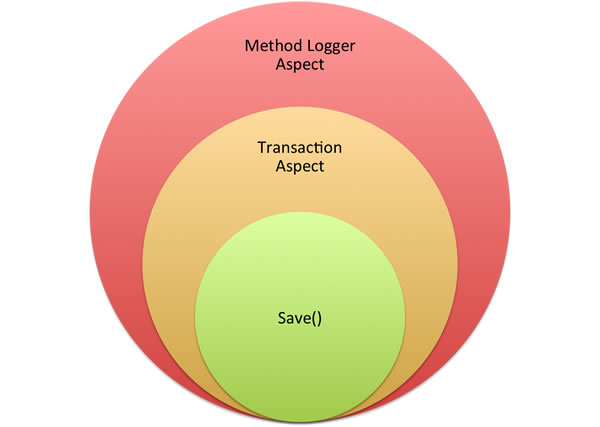
Now that we have activated the AOP engine, let's build a simple method logger aspect that will intercept before our method is called and after our method is called. So if you remember your AOP dictionary terms, we will create an aspect that does a before and after advice on the method. Phew! To do this we must implement a CFC that WireBox AOP gives you as a template: wirebox.system.aop.MethodInterceptor. This CFC interface looks like this:
This means, that we must create a CFC that implements the invokeMethod method with our own custom code. It also receives 1 argument called invocation that maps to a CFC called wirebox.system.aop.MethodInvocation that you can learn from our cool API.
Our approach to AOP is simplicity, therefore this invokeMethod implements the most powerful advice called around advice, so you will always do an around advice, but it will be up to your custom code to decide what it does before (beforeAdvice), around (aroundAdvice) and after (afterAdvice) the method call.
The other advantage of WireBox AOP aspects is that once they are registered with WireBox they act just like normal DI objects in WireBox, therefore you can apply any type of dependency injection to them.
Removals
BeanPopulator
The BeanPopulator class has been removed. This class was deprecated in ColdBox 6 and was replaced by the ObjectPopulator class. Please use coldbox.system.core.dynamic.ObjectPopulator instead.
ColdBox Util Env/System Methods
The following methods were removed in preference to the Environment Delegate class: coldbox.system.core.delegates.Env.
Binder.getProperty() default Argument Removed
The default argument was deprecated in ColdBox 6 and has now been removed. Please use defaultValue instead.
Binder.getCacheBoxConfig() Removed
The getCacheBoxConfig() method was deprecated in ColdBox 6 and has now been removed. Please use getCacheBox() instead.
InterceptorService.processState() Removed
The processState() method has been removed from the InterceptorService (COLDBOX-1358). This method was deprecated and has now been completely removed.
Migration: Use the announce() method instead.
Deprecations
The following methods were deprecated in WireBox 7 and will be removed in WireBox 9.
getProperty( name, [default] ) : Get a specific property
getProperties() : Get all the properties structure
propertyExists( name ) : Check if a property exists
setProperty( name, value ) : Dynamically add properties to the structure
// Init with your own properties
new wirebox.system.ioc.Injector( properties = myProps )
Description
entityService
Inject a BaseORMService object for usage as a generic service layer
entityService:{entity}
Inject a VirtualEntityService object for usage as a service layer based off the name of the entity passed in.
DSL
// Generic ORM service layer
property name="genericService" inject="entityService";
// Virtual service layer based on the User entity
property name="userService" inject="entityService:User";
: Persist in a registered scope: session, request, singleton, custom, etc.
transientCache : Enable/disable per-request transient injection caching for this mapping (defaults to true)
This annotation has two sub annotations that you can also leverage for granular control of your CacheBox integration:
cacheTimeout - The timeout in minutes (optional)
cacheLastAccessTimeout - The last access or idle timeout in minutes (optional)
Caution When storing objects in volatile scopes like cache, session, request, etc. You must be careful of not injecting them directly into singletons or other volatile objects as you could have memory leaks via a side effect called Scope Widening Injection. We recommend combining them via WireBox Providers to avoid this side effect.
// cache into the default provider
component cache{}
// cache into the default provider
component cachebox{}
// cache into the ehcache provider
component cachebox="ehcache"{}
// cache into the ehcache provider with settings
component cachebox="ehcache" cacheTimeout="20"{}
// cache with settings
component cache cacheTimeout="60" cacheLastAccessTimeout="10"{}
DSL
Description
executor
Inject an executor using the property name as the key
ID in the binder. However, you can also get mega funky and do this:
inject="provider:logbox:logger:{this}"
and WireBox will create a provider of
logbox:logger:{this}
.
Caution Remember that the value of the provider can be a simple ID or a full injection DSL.
That's it! You basically use the provider:{mapping} injection DSL to tell a property, setter or argument that you want a provider object instead of the real deal. This will allow you to delay construction of such an object or avoid the nasty pitfall of scope widening injection.
// use the provider DSL namespace on a property
property name="searchCriteria" inject="provider:requestCriteria";
// use the provider DSL namespace on a constructor argument
function init(coolObjectProvider inject="provider:HardToConstructObject"){
variables.coolObjectProvider = arguments.coolObjectProvider;
return this;
}
// To use it
searchCriteria.get().getCriteria();
coolObjectProvider.get().executeSomeMethod();
provider:{injectionDSL}
Build an object provider that will return the object that the {injectionDSL} refers to
DSL
Description
provider
Build an object provider that will return the mapping according to the property, method or argument name.
Build an object provider that will return the {name} mapping.
// using id
property name="timedService" inject="provider:TimedService";
// using DSL
property name="timedService" inject="provider:logbox:logger:{this}";
/**
* @deprecated Refactor to use the Env Delegate: coldbox.system.core.delegates.Env
*/
function getSystemSetting( required key, defaultValue ){
return new coldbox.system.core.delegates.Env().getSystemSetting( argumentCollection = arguments );
}
/**
* @deprecated Refactor to use the Env Delegate: coldbox.system.core.delegates.Env
*/
function getSystemProperty( required key, defaultValue ){
return new coldbox.system.core.delegates.Env().getSystemProperty( argumentCollection = arguments );
}
/**
* @deprecated Refactor to use the Env Delegate: coldbox.system.core.delegates.Env
*/
function getEnv( required key, defaultValue ){
return new coldbox.system.core.delegates.Env().getEnv( argumentCollection = arguments );
}
// Old way - removed
interceptorService.processState( "myEvent", data );
// New way - use announce()
interceptorService.announce( "myEvent", data );
New Features
WIREBOX-160 Threading concurrent modification issues in Mapping.cfc
Improvements
WIREBOX-159 Race condition when loading namespaced modules
Bugs
CACHEBOX-93statusCheck() typo not calling isEnabled()
Improvements
AbstractCacheProviderset... methods should have numeric timeout defaults
The WireBox injector class is the pivotal class that orchestrates DI, instance events and so much more. We really encourage you to study its API Docs to learn more about its construction and usage methods.
myObject = new coldbox.system.ioc.Injector().getInstance("my.object");
myObject = new coldbox.system.ioc.Injector("myBinderPath").getInstance("CoolObject");
Versioning
WireBox is maintained under the Semantic Versioning guidelines as much as possible.Releases will be numbered with the following format:
And constructed with the following guidelines:
Breaking backward compatibility bumps the major (and resets the minor and patch)
New additions without breaking backward compatibility bumps the minor (and resets the patch)
Bug fixes and misc changes bumps the patch
License
The ColdBox Platform, WireBox is open source and licensed under the Apache 2 License.
Copyright by Ortus Solutions, Corp
ColdBox, CacheBox, Wirebox, LogBox are registered trademarks by Ortus Solutions, Corp
We all make mistakes from time to time :) So why not let us know about it and help us out. We also love pull requests, so please star us and fork us: https://github.com/coldbox/coldbox-platform
WireBox is a professional open source library supported by Ortus Solutions. If you are interested in support please consider our Ninja Subscription Support or if you need consulting please purchase on of our Consulting Plans. Here are some areas that we can assist you with:
Because of His grace, this project exists. If you don't like this, then don't read it, its not for you.
"Therefore being justified by **faith**, we have peace with God through our Lord Jesus Christ: By whom also we have access by **faith** into this **grace** wherein we stand, and rejoice in hope of the glory of God." Romans 5:5
These methods can take up to two parameters depending on your mode of operation (standalone or ColdBox). The one main difference between pure Wirebox listeners and ColdBox interceptors is that the configure method for the standalone WireBox is different.
Below is my favorite approach to solving the issue which is by using provided methods:
That's it! My getUser() method will be replaced by WireBox with a proxy provider method that will request from the WireBox injector the user mapping instance.
component name="handler" singleton{
function getUser() provider="user"{}
}
object.
// Declare base CFC
map("BaseModel").to("model.base.BaseModel");
map("UserService").to("model.users.UserService").virtualInheritance("BaseModel");
About This Book
The source code for this book is hosted in GitHub: https://github.com/ortus-docs/wirebox-docs. You can freely contribute to it and submit pull requests. The contents of this book is copyright by Ortus Solutions, Corp and cannot be altered or reproduced without author's consent. All content is provided "As-Is" and can be freely distributed.
The majority of code examples in this book are done in cfscript.
The majority of code generation and running of examples are done via CommandBox: The ColdFusion (CFML) CLI, Package Manager, REPL -
All ColdFusion examples designed to run on the open source Lucee Platform or Adobe ColdFusion 11+
External Trademarks & Copyrights
Flash, Flex, ColdFusion, and Adobe are registered trademarks and copyrights of Adobe Systems, Inc.
Notice of Liability
The information in this book is distributed “as is”, without warranty. The author and Ortus Solutions, Corp shall not have any liability to any person or entity with respect to loss or damage caused or alleged to be caused directly or indirectly by the content of this training book, software and resources described in it.
Contributing
We highly encourage contribution to this book and our open source software. The source code for this book can be found in our where you can submit pull requests.
Charitable Proceeds
10% of the proceeds of this book will go to charity to support orphaned kids in El Salvador - . So please donate and purchase the printed version of this book, every book sold can help a child for almost 2 months.
Shalom Children's Home
Shalom Children’s Home () is one of the ministries that is dear to our hearts located in El Salvador. During the 12 year civil war that ended in 1990, many children were left orphaned or abandoned by parents who fled El Salvador. The Benners saw the need to help these children and received 13 children in 1982. Little by little, more children came on their own, churches and the government brought children to them for care, and the Shalom Children’s Home was founded.
Shalom now cares for over 80 children in El Salvador, from newborns to 18 years old. They receive shelter, clothing, food, medical care, education and life skills training in a Christian environment. The home is supported by a child sponsorship program.
We have personally supported Shalom for over 6 years now; it is a place of blessing for many children in El Salvador that either have no families or have been abandoned. This is good earth to seed and plant.
Installing WireBox
WireBox can be installed as a standalone framework or included with the latest ColdBox Platform release, so it is unnecessary if you are within a ColdBox application.
Supported Languages
WireBox supports both BoxLang (preferred) and CFML (ColdFusion Markup Language):
Language
Extensions
Notes
System Requirements
BoxLang 1+ (Preferred)
Adobe ColdFusion 2023+
Lucee 6+
Standalone Installation
You can leverage to install the standalone version of WireBox with a simple command:
This will install WireBox as a dependency in your application into a folder called wirebox. You can then leverage the standalone namespace within your application: wirebox.system.ioc.
Mappings
You will need the following mapping that points to the folder you installed wirebox into:
This will ensure that the appropriate libraries can find each other.
Remember that this only applies to the standalone approach.
Namespaces
Standalone Namespace
wirebox.system.ioc
ColdBox Namespace
coldbox.system.ioc
Instance Creations
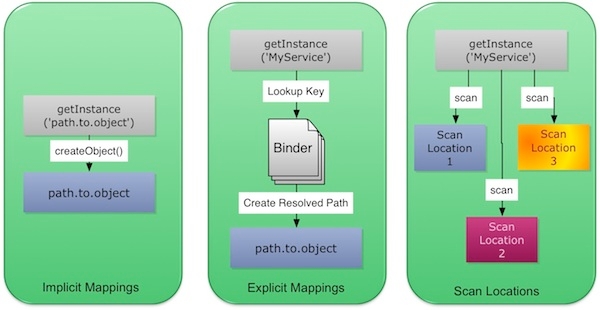
We have now coded our classes and unit tests with some cool annotations in record time, so what do we do next? Well, WireBox works on the idea of three ways to discover and create your classes:
Approach
Motivation
Pros
Cons
Implicit Mappings
So let's do examples for each where our classes we just built are placed in a directory called model of the root directory.
Implicit Creation
Explicit Binder Configuration
Explicit Creation
Scan Locations Binder Configuration
Set Locations Creation
So our recommendation is to always try to create configuration binders as best practice, but your requirements might dictate something else.
How WireBox Resolves Dependencies
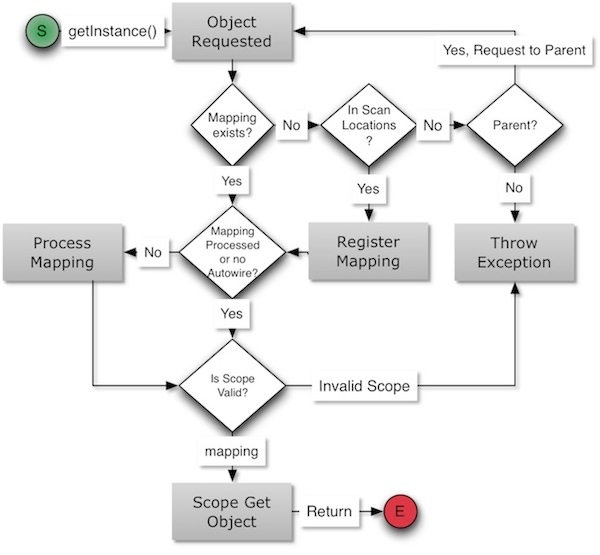
Most of the time we believe our DI engines should be black boxes, but we try to think otherwise. We encourage developers to know what is going on so they can debug easily and not hit their foreheads against their keyboards. Believe me, I have done so before. That is why WireBox is tightly integrated with LogBox to provide incredible debugging information to ANY appender you desire so you can know what is going on. Another aspect of knowing what the DI engine does is how dependencies are resolved. Here is a typical flow of injection:
Instance Creation
Object is requested by name and the Injector tries to check if the mapping exists for that name. If no mapping is found then it tries to locate the object by using the internal scan locations to try to find it. If it cannot find it and there is a parent injector defined, then the request is funneled to the parent injector and we start our process again. If no parent injector is declared and no localization, then we throw a not located exception.
If the object was found via the scan locations, then we register a new mapping according to its location and discover all the metadata out of the object in preparation for construction and DI
We now have a guaranteed mapping so we retrieve it and we verify if the mapping's metadata has been processed or not. If the mapping is marked with no autowiring then we skip to the next step. If not, we process the mapping's metadata and prepare it for DI
We verify that the scope define for the mapping exists, else we throw an invalid scope exception
We ask the scope to produce the mapping object for us. The scope is in charge of persistence, locking, etc.
The scope builds the instance by asking the injector to build a new instance with the correct constructor and constructor arguments and stores it in its scope once the injector builds it. The builder decides what type of construction is needed for the mapping as it can be a CFC, java object, webservice, RSS feed, factory method call, etc. Each constructor argument is processed for dependency resolution.
The scope then sends the instance for DI wiring and process back to the injector
The injector returns the instance
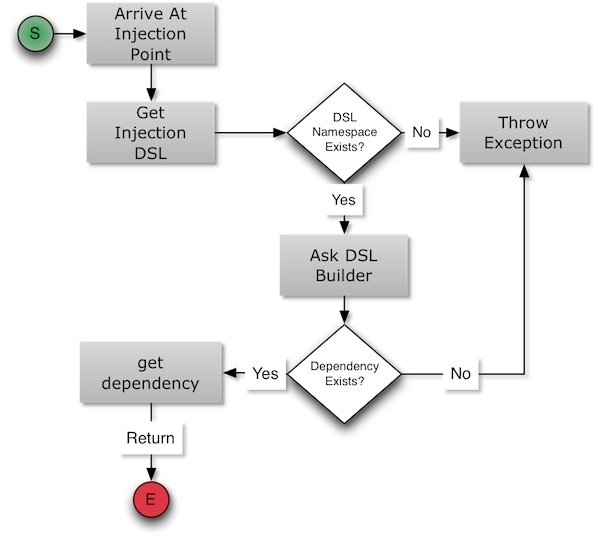
Dependency Resolution
Arrive at the desired injection point and get the injection DSL. If the DSL is empty, then it defaults to the id/model namespace. For this injection DSL Namespace we try to find a valid DSL builder for it. If none is found an exception is thrown. If we have a match, then the DSL builder is called with the DSL string to retrieve.
The DSL builder then tries to parse and process the DSL string for object retrieval. If the DSL is a WireBox mapping then we try to retrieve the instance by name (Refer back to Instance Creation).
If the builder could not produce an instance, it is logged and DI is skipped on it.
Caution Circular dependencies are supported in all injection styles within WireBox. With one caveat, if you choose constructor arguments with circular dependencies, you must use object providers.
Mapping Initiators
Ok, now that we know how to configure WireBox, let's get into the fun stuff of object mapping. How do we do this? By using our DSL mapping initiators that tell WireBox how to start the object registration process. You will then concatenate the initiators with some DSL destinations methods, DI data, etc to tell WireBox all the information it might need to construct, wire and persist the object. Here are the DSL initiators:
Method Signature
Description
map(alias)
The method that starts the mapping process. You pass in a mapping name or a list of names to start registering
Caution From the methods we have seen above only the map() and with() methods require a DSL destination.
Injector Constructor Arguments
The injector can be constructed with three optional arguments:
Argument
Type
Required
Default
Description
binder
If you are using WireBox within a ColdBox application, you don't even need to do any of this, we do it for you by using some configuration data in your ColdBox configuration file or conventions.
By default, WireBox when constructed is automatically stored in application scope as application.wirebox
Injection DSL
The injection DSL is a domain specific language that denotes what to inject in the current placeholder: property, argument, or method via the inject annotation. This injection DSL not only can it be used via annotations but also via our mapping DSL whenever a dsl argument can be used. This DSL is constructed by joining words separated by a : colon. The first part of this string is what we will denote as the injection DSL Namespace.
inject="{namespace}:extra:extra:extra"
Property Annotation
Every property can be annotated with our injection annotations:
inject : The injection DSL
scope : The visibility scope to inject the dependency into. By default it injects into variables scope
Constructor Argument Annotation
You can also annotate constructor arguments with the inject annotation:
Setter Method Annotation
You can also annotate setter methods with the inject annotation to provide injections:
WireBox offers a wide gamut of annotation namespaces you can use in your BoxLang and CFML applications and ColdBox applications. However, we took it a step further and allowed you to create your own custom DSL namespaces making your annotations come alive!
Custom ORM Event Handler - for use in any CFML application
Custom ORM Event Handler
In order to leverage WireBox for entity injection you will have to create your own custom ORM event handler and activate event handling in the ORM at the Application.cfc
Then you can create the custom event handler with a custom postLoad() function where you will leverage WireBox for DI.
Custom Providers
If you need to abstract old legacy code or have funky construction processes, we would recommend you build your own provider objects. This means that you will create a component that implements wirebox.system.ioc.IProvider (one get() method) and then you can map it. Once mapped, you can use it anywhere WireBox listens for providers:
The Injection DSL →
property name="" inject="provider:{name or injectionDSL}";
The mapping DSL
Here is the interface you need to implement:
The CFC you build will need to be mapped so it can be retrieved by name and also so if it needs DI or any other WireBox funkiness, it can get it. So let's look at our FunkyEspressoProvider that we needed to create since we have some old legacy machines that we need to revamp:
Finally we map to the provider using the .toProvider() mapping method in the binder so anytime somebody requests an Espresso we can get it from our funky provider. Please note that I also map the provider because it also has some DI needed.
Cool! That's it, anytime you request an Espresso, WireBox will direct its construction to the provider you registered it with.
Property Observers
Observe any property and react!
WireBox supports the concepts of component property observers. Meaning that you can define a function that will be called for you when the setter for that property has been called and thus observe the property changes within a component.
You will accomplish this by tagging a property with an annotation called observed and created a function called: {propertyName}Observer by convention. This function will receive three arguments:
newValue : The value that will be set into the property
oldValue : The old value of the property, including null
property : The name of the property
If you don’t like the convention and want to name the function as you see fit, then you can place the value of the observed annotation as the name of the function to call.
Please note that the observer will be called AFTER the property has been set. That's it, enjoy!
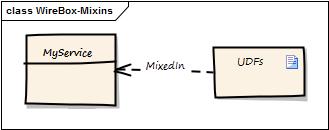
Runtime Mixins()
You can use the mixins() binder method or mixins annotation to define that a mapping should be mixed in with one or more set of templates. It will then at runtime inject all the methods in those templates and mix them into the target object as public methods.
// map with mixins
map("MyService")
.to("model.UserService")
.mixins("/helpers/base");
// map with mixins as list
map("MyService")
.to("model.UserService")
.mixins("/helpers/base, /helpers/model");
// map with mixins as array
map("MyService")
.to("model.UserService")
.mixins( ["/helpers/base", "/helpers/model"] );
// Via annotation
component mixins="/helpers/base"{
}
This will grab all the methods in the base.cfm and model.cfm templates and inject them into the target mapping as public methods. Awesome right?
Tip The list of templates can include a .cfm extension or none at all
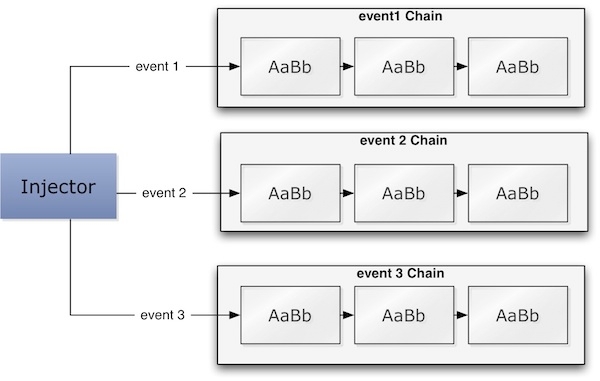
WireBox Event Model
WireBox also sports event-driven programming where it can announce several object life cycle events, and you can listen to them by creating listener CFCs.
Note: If you are within a ColdBox application, you get the benefit of all the potential of ColdBox Interceptors, and if you are in standalone mode, well, you get the listener, and that's it.
Each event execution also comes with a structure of name-value pairs called data that can contain objects, variables, and all kinds of data useful for listeners. This data is sent by the event caller, and each event caller decides what this data sent is. Also, remember that WireBox can also be run with a reference to CacheBox, which also offers lots of internal events you can tap into. So, let's start investigating first the object's life cycle events.
Registering a Custom DSL
To register a custom namespace in WireBox, place the following configuration in the wirebox struct defined within the configure() method of your WireBox binder CFC. in a ColdBox app, this is /config/WireBox.cfc. Alternatively, you can use the mapDSL() call in the configure() method.
If you want to register a custom DSL namespace from a module, you can make the same call via the binder reference that is provided to your ModuleConfig.cfc.
ModuleConfig.cfc
component {
function configure() {
binder.mapDSL("ortus","path.model.dsl.MyDSL");
}
}
Now I can use the ortus DSL Namespace in my mappings DSL and even my annotations, isn't that cool!
Dynamic Custom DSL Registration
Injectors allow you to register custom DSLs at runtime by using the registerDSL() method on any injector.
AOP Intro
WireBox fully supports aspect-oriented programming (AOP) for ColdFusion (CFML) and any ColdFusion framework. Just note the different namespaces if using within the ColdBox Platform and standalone WireBox.
Here are a list of the most useful methods in this CFC
getMethod() : Get the name of the method (join point) that we are proxying and is being executed
getMethodMetadata() : Get the metadata structure of the current executing method. A great way to check for annotations on the method (join point)
getArgs() : Get the argument collection of the method call
setArgs() : Override the argument collection of the method call
getTarget() : Get the object reference to the target object
getTargetName() : Get the name of the target object
getTargetMapping() : Get the object mapping of the proxied object. Great for getting metadata information about the object, extra attributes, etc.
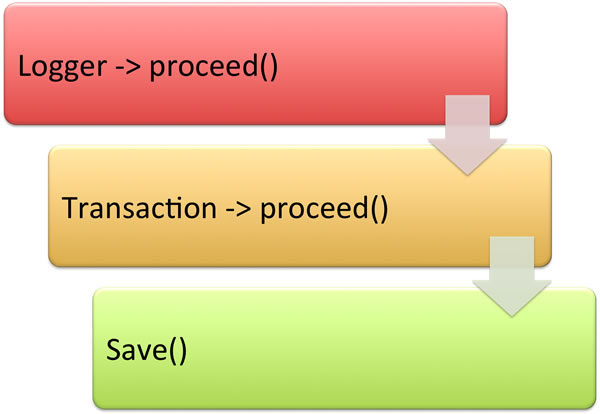
proceed() : This is where the magic happens, this method tells WireBox AOP to continue to execute the target method. If you do not call this in your aspect, then the proxyied method will NOT be executed.
The last method is the most important one as it tells WireBox AOP to continue executing either more aspects, the proxyed method or nothing at all.
Contributing Guide
The best way to contribute to WireBox
Hola amigo! I'm excited that you are interested in contributing to ColdBox, CacheBox, LogBox, and/or WireBox. Before submitting your contribution, please make sure to take a moment and read through the following guidelines:
Code Of Conduct
This project is open source, and as such, the maintainers give their free time to build and maintain the source code held within. They make the code freely available in the hope that it will be of use to other developers and/or businesses. Please be considerate towards maintainers when raising issues or presenting pull requests. We all follow the Golden Rule: Do to others as you want them to do to you.
Configuring WireBox
When using WireBox inside of ColdBox, the binder CFC is located by convention in /config/WireBox.cfc (or /config/WireBox.bx for BoxLang applications). When using WireBox outside of ColdBox, you can create a binder anywhere with any name using one of these two approaches:
1. Extend the WireBox Binder — create a configuration class that extends coldbox.system.ioc.config.Binder and implements a configure() method:
2. Simple configuration class — create a class with a
Persistence DSL
The next step in our mapping DSL excursion is to learn about how WireBox will persist these object mappings into WireBox scopes. By default (as we have seen), all object mappings are transient objects and they belong to a scope type called NOSCOPE.
However, we need to specifically tell WireBox into what scope the declared mapped objects should be placed on in order for us to leverage caching, the singleton pattern, etc. This is accomplished by leveraging our persistence component annotations or the following methods if you prefer a non-annotation approach:
Note Please note that all WireBox configuration binders have two public properties:
These classes have on themselves several public properties that are a cool shorthand way to link to construction types or persistence scopes
Models Namespace
The default namespace is not specifying one. This namespace is used to retrieve either named mappings or full component paths.
1st Level DSL
Lazy Properties
Wanna be lazy?
WireBox supports the concept of marking properties in your components as lazy. This will allow the property to be constructed ONCE when requested ONLY (lazy loaded). This way, you can take advantage of the construction of the property being lazy-loaded for you.
Please note that this is different than providers since in this case, you provide the function that will build the property and it can be anything you want.
Internally, we will generate a getter method for you that will make sure to construct your property via a builder function you will provide, lock the request (by default), store it in the
Child Injectors
Overview
Welcome to the world of hierarchical dependency injection. We had the ability before to add a parent injector to WireBox, but you can not only add a parent, but also many children to the hierarchy.
Every injector has the capability to store an ordered collection (ordered struct) of child injectors via the childInjectors property. Child injectors are used internally in many instances to provide a hierarchical approach to DI where instances can be
The Scope Interface
The scope interface can be found here: coldbox.system.ioc.scopes.IScope.
Please note that you DO NOT need to add the implements to your code. We actually highly suggest you don't. There are many issues with interfaces yet in multiple CFML engines. So we do runtime checks for it, instead at compile time.
AOP Vocabulary
Aspect: A modularization of a concern that cuts across multiple objects.
Target Object : The object that will be applied with Aspects across certain methods or join points.
Join Point : A point of execution in a target object that will be applied a specific aspect to it. This is usually the execution of a method.
Overview
In computing, aspect-oriented programming (AOP) is a programming paradigm which aims to increase modularity by allowing the separation of cross-cutting concerns. AOP forms a basis for aspect-oriented software development.
I won't go into incredible software theory but pragmatic examples. What is the value of AOP? What does it solve? Well, how many times have we needed to do things like this:
As you can see from the example above, my real business logic is in the //do some work here comment, but our code is littered with logging and transactions. What if I have 10 methods that are very familiarly the same? Do I repeat this same littered code ()? The answer for most of us has always been "YES! Of Course! How else do I do this?".
Well, you don't have to, AOP to the rescue. What AOP will let you do is abstract all that logging and transaction code to another object usually called an Aspect. Then we need to apply this aspect to something right? Well, in our case it has to apply to a target object, our
Activate The AOP Listener
WireBox has an amazing that can help you modify, listen and do all kinds of magic during object creation, wiring, etc. Our AOP implementation is just a listener (wirebox.system.aop.Mixer) that will transform objects once they are finalized with dependency injection. This means, our AOP engine is completely decoupled from the internals of the DI engine and is incredibly fast and light weight.
So let's activate it in our WireBox binder configuration:
That's it! That tells WireBox to register the AOP engine once it loads. This listener also has some properties that you can tweak:
mapPath(path)
Map a CFC instantiation path. This method internally delivers a two-fold punch of doing map('CFCFileName').to(path). This is a quick way to map a CFC instantiation path that uses the name of the CFC as the mapping name
A cool method that tells WireBox to automatically register ALL the CFCs found recursively in that instantiation package path. All CFCs will be registered using their CFC names as the mapping names and WireBox will inspect all the CFCs immediately for DI metadata. The include and exclude arguments can be used for inclusions/exclusions lists via regex. The influence argument can be a UDF or closure that will affect the iterating registrations of objects. The filter argument can be a UDF or closure that will filter out or in the CFCs found, an include/exclude on steroids
unMap(alias)
Unmap/delete a mapping in the binder
with(alias)
This method is a utility method that retrieves the alias mapping so you can start concatenating methods for that specific mapping. Basically putting it into a workable context
this.ormSettings = {
cfclocation="model",
dbcreate = "update",
dialect = "MySQLwithInnoDB",
logSQL = true,
// Enable event handling
eventhandling = true,
// Set the event handler to use, which will be inside our application or the default wirebox one
eventhandler = "model.ORMEventHandler"
};
map("MyCFC").toProvider('name or injectionDSL')
// or
setter,property,methodArg,initArg(name="",dsl="provider:{name or injectionDSL}");
<cfinterface hint="The WireBox Provider Interface that follows the provider pattern">
<--- get --->
<cffunction name="get" output="false" access="public" returntype="any" hint="Get the provided object">
</cffunction>
</cfinterface>
component{
property name="data" observed;
/**
* Observer for data changes. Anytime data is set, it will be called
*
* @new The new value
* @old The old value
* @property The name of the property observed
*/
function dataObserver( newValue, oldValue, property ){
// Execute after data is set
}
}
// inject it into a CFC
property name="funky" inject="ortus:funkyObject";
// map it in your WireBox Binder
map("Luis")
.toDSL("ortus:funkyObject");
/**
* Copyright Since 2005 ColdBox Framework by Luis Majano and Ortus Solutions, Corp
* www.ortussolutions.com
* ---
* The main interface to produce WireBox storage scopes
**/
interface {
/**
* Configure the scope for operation and returns itself
*
* @injector The linked WireBox injector
* @injector.doc_generic coldbox.system.ioc.Injector
*
* @return coldbox.system.ioc.scopes.IScope
*/
function init( required injector );
/**
* Retrieve an object from scope or create it if not found in scope
*
* @mapping The linked WireBox injector
* @mapping.doc_generic coldbox.system.ioc.config.Mapping
* @initArguments The constructor struct of arguments to passthrough to initialization
*/
function getFromScope( required mapping, struct initArguments );
/**
* Indicates whether an object exists in scope
*
* @mapping The linked WireBox injector
* @mapping.doc_generic coldbox.system.ioc.config.Mapping
*
* @return coldbox.system.ioc.scopes.IScope
*/
boolean function exists( required mapping );
}
Required
Default
Description
generationPath
cf include path
false
/wirebox/system/aop/tmp
The location where UDF stubs will be generated to. This can be to disk or memory.
classMatchReload
boolean
false
false
A cool flag to allow you to reload the class matching dictionary for development purposes only.
Same as saying id. Get a mapped instance with the same name as defined in the property, argument or setter method.
id
Get a mapped instance with the same name as defined in the property, argument or setter method.
model
Get a mapped instance with the same name as defined in the property, argument or setter method.
2nd Level DSL
DSL
Description
model:{name}
Get a mapped instance by using the second part of the DSL as the mapping name.
id:{name}
Get a mapped instance by using the second part of the DSL as the mapping name.
3rd Level DSL
DSL
Description
model:{name}:{method}
Get the {name} instance object, call the {method} and inject the results
id:{name}:{method}
Get the {name} instance object, call the {method} and inject the results
DSL
Description
variables
scope, and return it to you.
Note: With lazy properties, you must use the getter only to retrieve the property ONLY!
Implicit Builder
When you tag a property as lazy, we will look for a method using the following pattern by convention:
We will lock, call the builder, store the property and return it.
Explicit Builder
If you want to use ANY method in your CFC to build the property, then use the value of the lazy annotation to point to the public or private method that will build your property:
No Locking
By default, WireBox will lock the construction of the property. If you do not want the locking to occur, use the LazyNoLock attribute. Just as before, if you don’t have a value for the annotation, we will look for a build{propertyName} function, or if it has a value, we will use that as the name of the builder function.
// Simple Creation - automatically stored in application.wirebox
new coldbox.system.ioc.Injector()
// Custom Binder
new coldbox.system.ioc.Injector( "config.MyBinder" )
// Custome Binder + Properties
new coldbox.system.ioc.Injector( "config.MyBinder", { props } )
function setService( required service ) inject="UserService" {
variables.service = arguments.service
}
function setService( required service ) inject="UserService" {
variables.service = arguments.service;
}
component implements="CFIDE.orm.IEventHandler"{
{% hint style="info" %}
WireBox uses a per-request transient injection cache by default, so repeated `autowire()` calls for the same entity mapping during a request reuse the resolved injections and delegations. You can disable this globally via `transientInjectionCache` or per-entity with the `transientCache="false"` annotation.
{% endhint %}
/**
* postLoad called by hibernate which in turn announces a coldbox interception: ORMPostLoad
*/
public void function postLoad(any entity){
application.wirebox.autowire(
target=arguments.entity,
targetID="ORMEntity-#getMetadata( arguments.entity ).name#"
);
}
}
component name="FunkyEspressoProvider" implements="coldbox.system.ioc.IProvider" singleton{
property name="log" inject="logbox:logger:FunkyEspressoProvider";
public function init(){ return this; }
Espresso public function get(){
// log
log.canDebug(){ log.debug("Requested funky espresso"); }
var espresso = createObject("component","old.legacy.Espresso").init();
// add some sugar as the old legacy machine is not that great.
espresso.addSugar(1);
// returned provided object.
return espresso;
}
}
component extends="coldbox.system.ioc.config.Binder"{
function configure(){
// map the provider first, so it can be constructed and DI performed on it.
map("FunkyEspressoProvider")
.to("model.legacy.FunkyEspressoProvider");
// map espresso's to the old funky provider for construction and retrieval.
map("Espresso")
.toProvider("FunkyEspressoProvider");
}
}
component{
property name="data" observed="myObserver";
/**
* Observer for data changes. Anytime data is set, it will be called
*
* @new The new value
* @old The old value
* @property The name of the property observed
*/
function myObserver( newValue, oldValue, property ){
// Execute after data is set
}
}
// Let's assume we have mapped a few objects called: UserService, SecurityService and RoleService
// Empty inject, use the property name, argument name or setter name
property name="userService" inject;
// Using the name of the mapping as the value of the inject
property name="security" inject="SecurityService";
// Using the full namespace
property name="userService" inject="id:UserService";
property name="userService" inject="model:UserService";
// Simple factory method
property name="roles" inject="id:RoleService:getRoles";
component{
// Lazy property: Constructed by convention via the buildUtil() method
property name="util" lazy;
/**
* Build a util object lazyily.
* The first time you call it, it will lock, build it, and store it by convention as 'variables.util'
*/
function buildUtil(){
return new coldbox.system.core.util.Util();
}
}
function build{propertyName}(){}
component{
property name="data" lazy="constructData";
function constructData(){
return dataservice.buildStrongData();
}
}
component{
property name="util" lazyNoLock;
property name="util" lazyNoLock="constructUtil";
/**
* Build a util object lazyily.
* The first time you call it, build it, and store it by convention as 'variables.util'
*/
function buildUtil(){
return new coldbox.system.core.util.Util();
}
function constructUtil(){
return new coldbox.system.core.util.Util();
}
}
As contributors and maintainers of this project, we pledge to respect all people who contribute through reporting issues, posting feature requests, updating documentation, submitting pull requests or patches, and other activities.
Participants will be tolerant of opposing views.
Examples of unacceptable behavior by participants include the use of sexual language or imagery, derogatory comments or personal attacks, trolling, public or private harassment, insults, or other unprofessional conduct.
Project maintainers have the right and responsibility to remove, edit, or reject comments, commits, code, wiki edits, issues, and other contributions not aligned with this Code of Conduct. Project maintainers who do not follow the Code of Conduct may be removed from the project team.
When interpreting the words and actions of others, participants should always assume good intentions. Emotions cannot be derived from textual representations.
Instances of abusive, harassing, or otherwise unacceptable behavior may be reported by opening an issue or contacting one or more of the project maintainers.
Bug Reporting
Each of the main standalone frameworks in ColdBox has separate locations for submitting bug reports. Please also ensure that if you submit a pull request, you link it to the appropriate issue.
If you file a bug report, your issue should contain a title, a clear description of the issue, a way to replicate the issue, and any support files we might need to replicate your issue. The goal of a bug report is to make it easy for yourself - and others - to replicate the bug and develop a fix for it. All issues that do not contain a way to replicate will not be addressed.
Support Questions
If you have questions about usage, professional support, or just ideas to bounce off the maintainers, please do not create an issue. Leverage our support channels first.
The master branch is just a snapshot of the latest stable release. All development should be done in dedicated branches. Do not submit PRs against the master branch. They will be closed.
All pull requests should be sent against the development branch or the LTS version branch releases/v{version}
It's OK to have multiple small commits as you work on the PR - GitHub will automatically squash it before merging.
Make sure all local tests pass before submitting the merge.
Please make sure all your pull requests have companion tests.
Please link the Jira issue in your PR title when sending the final PR
Security Vulnerabilities
If you discover a security vulnerability, please email the development team at [email protected] and make sure you report it to the #security channel in our Box Team Slack Channel. All security vulnerabilities will be promptly addressed.
Development Setup
We have added all the necessary information to develop on ColdBox in our readme collaboration area and our tests readme so you can set up the database to test against.
Language Compatibility
Please make sure your code runs on the following Supported CFML Engines:
Lucee 5+
Adobe ColdFusion 2018+
Coding Styles & Formatting
We are big on coding styles and have included a .cfformat.json in the root of the project so that you can run the formatting tools and CommandBox scripts:
We recommend that anytime you hack on the core, you start the format watcher (box run-script format:watch). This will monitor your changes and auto-format your code for you.
You can also see the Ortus Coding Standards you must follow here: https://github.com/Ortus-Solutions/coding-standards.
CFC Docs With DocBox
All CFCs are self-documenting, and we leverage DocBox to document the entire software. All functions must be properly documented using the DocBox syntax: https://docbox.ortusbooks.com/getting-started/annotating-your-code
Financial Contributions
You can support ColdBox and all of our Open Source initiatives at Ortus Solutions by becoming a Patreon. You can also get lots of goodies and services depending on the level of contributions.
# Format everything
box run-script format
# Start a watcher, type away, save and auto-format for you
box run-script format:watch
configure( binder )
method that accepts a WireBox binder object:
// config/WireBox.bxclass { function configure(
// config/WireBox.cfccomponent{function
The latter approach will be less verbose when talking to the mapping DSL the Binder object exposes. However, both are fully functional and matter of preference.
From the configure() method you will be able to interact with the Binder methods or creating implicit DSL structures in order to configure WireBox for operation and also to create object mappings. From the onLoad() method you can also use it for mappings with main distinction that the WireBox machinery is now online (logging, events, caching, etc). This is necessary for leveraging mapDirectory() calls.
Please also note that the Binder itself has a reference to the current Injector it belongs to (getInjector()).
When you instantiate the WireBox injector, pass either the class path to your binder or an instance of it:
// Path-based
new coldbox.system.ioc.Injector( "path.to.my.Binder" )
// Instance-based
var oBinder = new path.to.my.Binder()
new coldbox.system.ioc.Injector( oBinder )
new wirebox.system.ioc.Injector( "path.to.my.Binder" );
// or
var oBinder = createObject( "path.to.my.Binder" );
new wirebox.system.ioc.Injector( oBinder );
// config/WireBox.bxclassextends="coldbox.system.ioc.config.Binder" { function configure(){} function onLoad(){} function onShutdown(){}}
Maps an object to the WireBox internal Singleton scope
into(scope)
Maps an object to a valid WireBox internal scope or any custom registered scopes by using the registered scope name. Valid internal WireBox scopes are: NOSCOPE PROTOTYPE SINGLETON SESSION APPLICATION REQUEST SERVER CACHEBOX
Maps an object to be created immediately once the Injector is created. By default all object mappings are lazy loaded in construction.
So just remember that these persistence DSL methods are not mandatory. If you are an annotations kinda developer, then you can easily add these persistence annotations to your classes.
Caution Please note that by leveraging scopes that can expire such as cachebox,request,session,applications,etc you must take into account the way they are injected into other objects. They can experience a DI side effect called scope widening injection that can link an object reference that expires into another object reference that does not expire (like singleton). This causes nasty side effects and issues, so please refer to the WireBox Providers section to find out how you can avoid this nasty pitfall by using WireBox providers.
this.TYPES - Enum class (coldbox.system.ioc.Types)
this.SCOPES - Enum class (coldbox.system.ioc.Scopes)
Here are some of the new methods to assist with child injectors:
hasChildInjector( name ) - Verify if a child injector has been registered
registerChildInjector( name, child ) - Register a child injector by name
removeChildInjector( name ) - Remove a child injector by name
getChildInjector( name ) - Get a child injector by name
getChildInjectors() - Get all the child injectors registered
getChildInjectorNames() - Get an array of all the registered child injectors
Child Enhanced Methods
getInstance()
The getInstance()method has an injector argument so you can EXPLICITLY request an instance from a child injector by name getInstance( name : "service", injector : "childInjector" )
Apart from the explicit lookup it can also do implicit hierarchical lookups using the following order:
Locally
Parent
All Children (in order of registration)
containsInstance( name ) - This method now also searches in the child collection for the specific name instance. The lookup searches in the following order:
Locally
Parent
shutdown() - The shutdown method has been enhanced to issue shutdown method calls to all child injectors registered.
Getting Instances From Specific Child Injectors
The getInstance() has been modified to have an injector argument that you can use to specifically ask for an instance from that child injector. If the child injector has not been registered you will get a InvalidChildInjector Exception.
Child Injector Explicit DSL
The following is the DSL you can use to explicitly target a child injector for a dependency. You will prefix it with wirebox:child:{name} and the name of the injector:
// Use the property name as the instance name
property name="categoryService" inject="wirebox:child:childInjector"
// Use a specific instance name
property name="categoryService" inject="wirebox:child:childInjector:CategoryService"
// Use any DSL
property name="categoryService" inject="wirebox:child:childInjector:{DSL}"
Advice : An action taken at a particular join point. Usually, before, after or around it.
AOP Proxy : An object or method representation for the original join point or method.
WireBox has an amazing event driven architecture that can help you modify, listen and do all kinds of magic during object creation, wiring, etc. Our AOP implementation is just a listener that will transform objects once they are finalized with dependency injection. This means, our AOP engine is completely decoupled from the interals of the DI engine and is incredibly fast and light weight. So let's activate it in our WireBox binder configuration:
That's it! That tells WireBox to register the AOP engine once it loads. This listener also has some properties that you can tweak:
What does applying an aspect mean? It means that we will take that aspect you write and execute it at different points in time during the execution of the method you want to apply it to. This is usually refer to as an advice, "Hey Buddy! Run it here!!!".
There are multiple types of AOP advices like before, around, after, etc. We have seen in ColdBox event handlers that you can do a preHandler, postHandler and and aroundHandler methods. These are AOP advices localized to event handlers that let you execute code before a handler event, after a handler event, or completely around the handler event. The most powerful form of advice is around, as it allows you to completely surround a method call with your own custom code. Does it ring a bell now? The transaction code for Pete's Sake! You need it to completely surround the method call! Voila! The around advice will allow you to completely take over the execution and you can even determine if you want to continue the execution or not.
So how does this magic happen? Well, our WireBox AOP engine will hijack your method (join point) and replace it with a new one, usually called an AOP proxy. This new method has all the plumbing already to allow you to apply as many aspects you like to that specific method. So as you can see from our diagram below, the save method is now decorated with our two aspects, but for all intent and purposes the outside world does not care about it, they just see the save() method.
component name="UserService"{
function save(){
log.info("method save() called with arguments: #serializeJSON(arguments)#");
transaction {
// do some work here
}
log.info("Save completed successfully!");
}
}
Very natural as you just request an object by its instantiation path. Very fast prototyping.
Refactoring is very hard as code is plagued with instantiation paths everywhere. Not DRY.
Explicit Mappings
To replace createObject() calls with named keys
DRY, you can create multiple named mappings that point to the same blueprint of a class. Create multiple iterations of the same class. Very nice decoupling.
Not as fast to prototype as we need to define our mappings before hand in our configuration binder.
Scan Locations
CFC discovery by conventions
A partial instantiation path(s) or folder(s) are mapped so you can retrieve by shorthand names. Very quick to prototype also without using full instantiation paths. Override of implementations can be easily done by discovery.
Harder concept to digest, not as straightforward as implicit and explicit locations.
injector = new wirebox.system.ioc.Injector();
espresso = injector.getInstance( "model.CoffeeShop" ).makeEspresso();
map("CoolShop").to("model.CoffeeShop");
injector = new wirebox.system.ioc.Injector();
espresso = injector.getInstance("CoolShop").makeEspresso();
wirebox.scanLocations = ["model"];
injector = new wirebox.system.ioc.Injector();
espresso = injector.getInstance("CoffeeShop").makeEspresso();
Wirebox is maintained under the Semantic Versioning guidelines as much as possible. Releases will be numbered in the following format:
<major>.<minor>.<patch>
And constructed with the following guidelines:
Breaking backward compatibility bumps the major (and resets the minor and patch)
New additions without breaking backward compatibility bump the minor (and resets the patch)
Bug fixes and misc changes bump the patch
LTS - Support Policy
Updates are provided for 12 months for all releases, and security fixes are provided for two years after the next major release.
Version
Release
Updates
Security Fixes
Releases
In this section, you will find the release notes for each version we release under this major version. If you are looking for the release notes of previous major versions, use the version switcher at the top left of this documentation book. Here is a breakdown of our major version releases.
Version 8.0 - October 2025
Migrating From ColdSpring
Easily migrate from ColdSpring to WireBox
ColdSpring was the first dependency injection framework for ColdFusion in the good 'ol days. It was inspired by Java Spring and it rocked during its tenure. As a matter of fact, there is still quite a large number of applications leveraging it, even though the framework itself is completely legacy, unsupported and might not even work on some versions of Adobe 2018+ as well. If you are in this technical debt boat and want a quick win and recover some ground in the technical debt war, then this document is for you.
If you have an application that leveraged ColdSpring for your dependency injection, you can easily port it to WireBox. The first step is converting the ColdSpring XML file to a WireBox Binder. This will translate 1-1 the bean configurations to WireBox configurations.
Then it will be up to you to test your objects and get up and running really quickly.
WireBox
WireBox is an enterprise ColdFusion Dependency Injection and Aspect Oriented Programing (AOP) framework. WireBox's inspiration has been based on the idea of rapid workflows when building object oriented ColdFusion applications, programmatic configurations and simplicity. With that motivation we introduced dependency injection by annotations and conventions, which has been the core foundation of WireBox.
WireBox is standalone framework for ColdFusion (CFML) applications and it is also bundled with the ColdBox Platform.
What's even more important its that WireBox is:
Modern
Actively Maintained
CommandBox
Make sure you have CommandBox CLI installed as we will be using it to and convert our XML file to WireBox DSL.
ColdSpring XML to WireBox DSL
Now it's time to install our module that converts ColdSpring XML to WireBox DSL:
This will install the coldspring-to-wirebox command into your CLI. You can get help by issuing a coldspring-to-wirebox --help command. However, it's very easy to use, so let's convert that XML file:
That's it! This will convert all your definitions and you are ready to roll!
Test Your Binder
We can now instantiate a new instance of WireBox with this Binder and use it!
Right now would be a great time to create some canary integration tests using which can verify that your objects can be created and wired up correctly. This will be a huge help to get you started on the road to better test coverage and migrating your legacy elephant to modern times:
Programmatic Configuration
Instead of declaring data structures you can use the methods in the binder to configure WireBox for operation. All methods return an instance of the binder so you can concatenate methods.
The method used to configure the injector's CacheBox integration. Ignored in an application context
autoProcessMappings( boolean )
Mapping Destinations
The mapping destinations tell WireBox what type of object you are mapping to. You will usually use these methods by concatenating map() or with() initiator calls:
Method Signature
Description
to(path)
Maps a name to a CFC instantiation path
Here are some examples:
Caution Please note that WireBox can create different types of objects for DI. However, only CFCs will be inspected for autowiring automatically unless you specifically tell WireBox that a certain mapping should not be autowired. In this case you will use the dependencies DSL to define all DI relationships.
Component Annotations
A part from using the configuration binder, you can also leverage component annotations to dictate behavior on the object.
Annotation
Type
Description
autowire
boolean
All objects are marked as autowire=true, so if you want to disable autowiring, you can add this annotation as false. You do NOT need to add this annotation if you want to autowire it, it is redundant if you do.
WireBox Events
WireBox's offers a wide gamut of life cycle events that are announced at certain points in execution time. Below are the current events announced by the Injector wirebox.system.ioc.Injector.
Event
Data
Description
afterInjectorConfiguration
injector : The calling injector reference
Please see our documentation to see all of CacheBox's events.
WireBox Namespace
Talk and get objects from the current WireBox injector.
1st Level DSL
DSL
Description
2nd Level DSL
3rd Level DSL
4th Level DSL
ColdBox Mode Listener
ColdBox Interceptors
In ColdBox, you will create ColdBox Interceptors to listen to any event in the application. Each of these methods that listen to events receive the following arguments:
Argument
Type
Description
event
Example
So, let's say we want to listen to the beforeInjectorShutdown and the afterInstanceCreation event in our listener.
Author
Luis Fernando Majano Lainez
Luis Majano is a Computer Engineer, published author, founder, and CEO of Ortus Solutions, Corp (www.ortussolutions.com), a consulting firm specializing in open-sourcing tooling, web development, architecture, and professional open-source.
He has been designing and working with software architecture and technologies since the year 2000. He has a passion for learning and mentoring developers so they can succeed with sustainable software practices and the usage and development of open-source software.
He is the creator of ColdBox HMVC, ContentBox Modular CMS, TestBox BDD, CommandBox CLI, and over 200 open-source projects. He speaks regularly at several international conferences, and you can read his blog at .
Luis is passionate about Jesus, tennis, golf, volleyball, and anything electronic. Random Author Facts:
He played volleyball in the Salvadorean National Team at the tender age of 17
The Lord of the Rings and The Hobbit is something he reads every 5 years. (Geek!)
His first computer was a Texas Instrument TI-99/4A that his parents gave him in 1986. After some time digesting his very first BASIC book, he had written his own tic-tac-toe game at the age of 9. (Extra geek!)
Keep Jesus number one in your life and in your heart. I did and it changed my life from desolation, defeat and failure to an abundant life full of love, thankfulness, joy and overwhelming peace. As this world breathes failure and fear upon any life, Jesus brings power, love and a sound mind to everybody!
“Trust in the LORD with all your heart, and do not lean on your own understanding.” – Proverbs 3:5
Contributors
Jorge Emilio Reyes Bendeck
Jorge is an Industrial and Systems Engineer born in El Salvador. After finishing his Bachelor studies at the Monterrey Institute of Technology and Higher Education , Mexico, he went back to his home country, where he worked as the COO of. In 2012 he left El Salvador and moved to Switzerland in pursuit of the love of his life. He married her and today he resides in Basel with his lovely wife Marta and their daughter Sofía.
Jorge started working as a project manager and business developer at Ortus Solutions, Corp. in 2013, At Ortus, he fell in love with software development and now enjoys taking part in software development projects and software documentation! He is a fellow Christian who loves to play the guitar, worship, and rejoice in the Lord!
Therefore, if anyone is in Christ, the new creation has come: The old has gone, the new is here!
2 Corinthians 5:17
Brad Wood
Brad grew up in southern Missouri, where he systematically disassembled every toy he ever owned, which occasionally led to unintentional shock therapy (TVs hold charge long after they've been unplugged, you know). After high school, he majored in Computer Science with a music minor at (Olathe, KS). Today he lives in Kansas City with his wife and three girls, where he still disassembles most of his belongings (including automobiles) with a slightly higher success rate of putting them back together again.) Brad enjoys church, international food, and the great outdoors.
Brad has been programming CFML for 12+ years and has used every version of CF since 4.5. He first fell in love with ColdFusion as a way to easily connect a database to his website for dynamic pages. Brad blogs at () and likes to work on solder-at-home digital and analog circuits with his daughter and build projects with Arduino-based microcontrollers.
Brad's CommandBox Snake high score is 141.
Scoping
We touched briefly on singleton and no scope objects in this section, so let's delve a little into what scoping is. WireBox's default behavior is to create a new instance of an object each time you request it via creation or injection (Transient/Prototype objects), this is the NO SCOPE scope.
Scopes allow you to customize the object's life span and duration. The singleton scope allows for the creation of only one instance of an object that will live for the entire life span of the injector. WireBox ships with several different life span scopes but you can also create your own custom scopes (). You can also tell WireBox in what scope to place the instance into by annotations or via the configuration binder. We have an entire section dedicated to discovering all the WireBox annotations, but let's get a sneak peek at them and also how to do it via our mapping DSL.
Common Methods
The following chart shows you the most common methods when dealing with the WireBox Injector. This doesn't mean there are no other methods on the Injector that are of value, so please check out the CFC Docs for more in-depth knowledge.
getInstance() – injector Argument
Dependencies DSL
The dependencies DSL methods are mostly used to define dependencies and also to activate advanced features on target objects, such as runtime mixins, virtual inheritance, etc.
Note Please note that you can concatenate more than one of these methods calls to dictate multiple constructor arguments, setter methods, cf properties, and more.
Method Signature
Description
Standalone Mode Listener
In standalone mode, the listener is a simple CFC with a configure() method and any methods that match the name of the events. Each of these methods receive the following arguments:
populateFromStruct
Populate a bean from a structure
Returns
This function returns Any
WireBox Injector Interface
We also provide an interface to create objects that adhere to our injector interface: wirebox.system.ioc.IInjector.
Please note that you DO NOT need to add the implements to your code. We actually highly suggest you don't. There are many issues with interfaces yet in multiple CFML engines. So we do runtime checks for it, instead at compile time.
Then these objects can be used as parent injectors, which are great for legacy factories or creating hierarchies according to your specs. All you have to do is implement the following interface:
Children (in order of registration)
required binder
){
}
function onLoad(){
}
function onShutdown(){
}
}
configure
(
required
binder
){
}
functiononLoad(){
}
functiononShutdown(){
}
}
The location where UDF stubs will be generated to. This can be to disk or memory.
classMatchReload
boolean
false
false
A cool flag to allow you to reload the class matching dictionary for development purposes only.
alias
string
A list of aliased names you can attach to a CFC instance apart from its Component name. This is great when using the mapDirectory() binder function.
eagerInit
none
All objects are lazy loaded unless they are marked with this annotation or marked as eager init in the binder configuration.
threadSafe
none or boolean
Determines the locking construction of the object for its wiring of dependencies. Please see our Object Persistence & Thread Safety Section.
scope
string
A valid WireBox scope or a custom registered scope. Remember that ALL components by default are placed in the NO SCOPE scope. This means they are considered transient objects.
singleton
none
Marks a component as a singleton object.
cachebox
string
Marks a component to be stored in CacheBox. The value of this annotation should be a valid registered CacheBox cache provider. The default cache provider is called default
cache
boolean
Marks a component to be cached in CacheBox in the default provider.
cacheTimeout
numeric
The timeout in minutes when the object is stored in the CacheBox provider
cacheLastAccessTimeout
numeric
The timeout in minutes when the object is stored in the CacheBox provider
mixins
list
A list of UDF templates to mixin into the object
Called right after the injector has been fully configured for operation.
beforeInstanceCreation
mapping : The mapping called to be created
Called right before an object mapping is built via our internal object builders or custom scope builders.
afterInstanceInitialized
mapping : The mapping called to be created
Called after an object mapping gets constructed and initialized. The mapping has NOT been placed on a scope yet and no DI/AOP has been performed yet
afterInstanceCreation
mapping : The mapping called to be created
Called once the object has been fully created, initialized, stored, and DI/AOP performed on it. It is about to be returned to the caller via its getInstance() method.
beforeInstanceInspection
mapping : The mapping that is about to be processed.
Called whenever an object has been requested and its metadata has not been processed or discovered. In this interception point you can influence the metadata discovery.
afterInstanceInspection
mapping : The mapping that is about to be processed.
Called after an object mapping has been completely processed with its DI metadata discovery. This is your last chance to change or modify the DI data in the mapping before it is cached.
beforeInjectorShutdown
injector : The calling injector reference
Called right before the Injector instance is shutdown.
afterInjectorShutdown
injector : The calling injector reference
Called right after the Injector instance is shutdown.
beforeInstanceAutowire
injector : The calling injector reference
Called right after the instance has been created and initialized, but before DI wiring is done.
afterInstanceAutowire
injector : The calling injector reference
Called right after the instance has been created, initialized and DI has been completed on it.
Enable or disable eager processing of all mappings at injector startup. Default is false (lazy load).
customListeners( list or array )
Append custom event listeners to the event manager.
listener(class,[properties],[name])
The method used to register a new listener within the injector's event manager
logBoxConfig(config)
The method used to tell the injector which LogBox configuration file to use for logging operations. Ignored in an application context
mapDSL(namespace,path)
The method used to register a new DSL annotation namespace with a DSL Builder object
mapScope(annotation,path)
The method used to register a new custom scope in this injector
parentInjector(injector)
Register a CFC reference to be the parent injector for the configuring injector
removeScanLocations(locations)
A method used to remove one or a list (array) of scan locations from the configuration binder
reset()
Reset the entire configuration binder to factory defaults
scanLocations(locations)
A method used to add one or a list (array) of scan locations to the configuration binder. If a path already exists it will not be appended again.
scopeRegistration(enabled,scope,key)
This method is used to tell the Injector if it should auto-register itself in any ColdFusion scope automatically
stopRecursions(classes)
A method used to register one or a list (array) of class paths the injector will look out for when discovering DI metadata. If these classes are found in the inheritance chain of an object, the injector will not process that inherited chain
transientInjectionCache(enabled)
Enable or disable the per-request transient injection/delegation cache
toDSL(dsl)
Maps a name to DSL builder string. Construction is done by using this DSL string (Look at Injection DSL)
toFactoryMethod(factory,method)
Maps a name to another mapping (factory) and its method call. If you would like to pass in parameters to this factory method call you will use the methodArg() DSL method concatenated to this method call
toJava(path)
Maps a name to a Java class that can be instantiated via createObject("java")
toProvider(provider)
Maps a name to another mapping (provider) that must implement the WireBox Provider interface (coldbox.system.ioc.IProvider)
toRSS(path)
Maps a name to an atom or RSS URL. WireBox will then use the cffeed tag to construct this RSS feed. It builds out into a structure with two keys: metadata : The metadata of the feed items : The items in the feed
toValue(value)
Maps a name to a constant value, which can be ANYTHING.
toWebservice(path)
Maps a name to a webservice WSDL URL. WireBox will create the webservice via createObject("webservice") for you.
wirebox:objectMetadata
Inject the target object's metadata struct
wirebox:parent
Get a reference to the parent injector (if any)
wirebox:properties
Get the entire properties structure the injector is initialized with. If running within a ColdBox context then it is the structure of application settings
wirebox:populator
Get a reference to a WireBox's Object Populator utility
wirebox:targetId
The target ID used when injecting the object
wirebox
Get a reference to the current injector
DSL
Description
wirebox:asyncManager
Get a reference to the Async Manager
wirebox:binder
Get a reference to the injector's binder
wirebox:eventManager
Get a reference to injector's event manager
DSL
Description
wirebox:child:{name}
Inject a child injector by name
wirebox:property:{name}
Retrieve one key of the properties structure
wirebox:scope:{scope}
Get a direct reference to an internal or custom scope object
# Produces a WireBox.cfc where you run the command
coldspring-to-wirebox tests/coldspring.xml.cfm
# Stores the WireBox.cfc in the same location as the file above
coldspring-to-wirebox tests/coldspring.xml.cfm tests/WireBox.cfc
new wirebox.system.ioc.Injector( "tests/WireBox" );
// Get an instance!
application.wirebox.getInstance( "MyOldBean" );
UserServiceSpec.cfc
component extends="testbox.system.BaseSpec"{
// executes before all suites
function beforeAll(){
wirebox = new wirebox.system.ioc.Injector( "path.to.Binder" );
}
// executes after all suites
function afterAll(){
structDelete( application, "wirebox" );
}
// All suites go in here
function run( testResults, testBox ){
describe( "UserService", () => {
it( "can be created and wired", () => {
var target = wirebox.getInstance( "UserService" );
expect( target ).toBeComponent();
expect( target.getUserDAO() ).toBeComponent();
} );
} );
}
}
You can tag a cfcomponent tag or component declaration with a scope={named scope} annotation that tells WireBox what scope to use
You can have nothing on the cfcomponent tag or component declaration which denotes the NO SCOPE
You can tag a cfcomponent tag or component declaration with a singleton annotation
Scope Configuration Binder
Internal Scopes
Here are the internal scopes that ship with WireBox:
Scope
Description
NOSCOPE
A prototype object that gets created every time it is requested.
PROTOTYPE
A prototype object that gets created every time it is requested.
SINGLETON
Only one instance of the object exists
This is cool! We can now have full control of how objects are persisted via the WireBox injector, we are not constricted to one type of persistence anymore.
Caution If you use a persistence scope that expires after time like session, request, cachebox, etc, you will experience a side effect called scope widening injection. WireBox offers a solution to this side effect via WireBox Providers, which we will cover in detail.
component extends="wirebox.system.ioc.config.Binder"{
function configure(){
// map with shorthand or full scope notation
mapPath("model.CoffeeShop").asSingleton();
mapPath("model.CoffeeShop").into(this.SCOPES.SINGLETON);
// map some long espresso into request scope
map("longEspress")
.to("model.Espresso")
.into(this.SCOPES.REQUEST);
// cache some tea
map("GreenTea")
.to("model.Tea")
.inCacheBox(timeout=20,provider="ehCache");
// cache some google news that refresh themselves every 40 minutes or after 20 minutes of inactivity
map("latestNews")
.inCacheBox(timeout=40,lastAccessTimeout=20,provider="ehCache");
.toRSS("http://news.google.com/news?output=rss")
}
}
The injector argument lets you route a creation request directly to a registered child injector:
// Create 'MyService' using the child injector named 'plugins'
var svc = wirebox.getInstance( name : "MyService", injector : "plugins" )
// Create 'MyService' using the child injector named 'plugins'
var svc = wirebox.getInstance( name="MyService", injector="plugins" );
Child Injectors
Child injectors allow you to create isolated DI scopes nested within a parent injector. A child inherits parent lookups but its own mappings are isolated.
// Bootstrap a child injector with its own binder
var child = new coldbox.system.ioc.Injector( "plugins.PluginsBinder" )
// Register it under the parent
wirebox.registerChildInjector( "plugins", child )
// Later: retrieve from child
var plugin = wirebox.getInstance( name : "MyPlugin", injector : "plugins" )
// Remove the child injector when no longer needed
wirebox.removeChildInjector( "plugins" )
// Bootstrap a child injector with its own binder
var child = new coldbox.system.ioc.Injector( "plugins.PluginsBinder" );
// Register it under the parent
wirebox.registerChildInjector( "plugins", child );
// Later: retrieve from child
var plugin = wirebox.getInstance( name="MyPlugin", injector="plugins" );
// Remove the child injector when no longer needed
wirebox.removeChildInjector( "plugins" );
// A method you can use to send objects to get autowired by convention or mapping lookups
autowire(target,[mapping],[targetID],[annotationCheck])
// A utility method that clears all the singletons from the singleton persistence scope. Great to do in development.
clearSingletons()
// Checks if an instance can be created by this Injector or not
containsInstance(name)
// Get the configuration binder for this injector
getBinder()
// The main method that asks the injector for an object instance by name or by autowire DSL string.
// 'injector' routes the request to a named child injector
getInstance([name],[initArguments],[dsl],[targetObject],[injector])
// Retrieve the ColdBox object populator that can populate objects from JSON, XML, structures and much more.
getObjectPopulator()
// Get a reference to the parent injector (if any)
getParent()
// Get a reference to a registered persistence scope
getScope(name)
// Set a parent injector into the target injector to create hierarchies
setParent(injector)
// Gracefully shut down the injector and all child injectors
shutdown()
// Return the injector's registered name
getName()
// -----------------------------------------------
// Child Injector Methods
// -----------------------------------------------
// Check whether a named child injector has been registered
hasChildInjector(name)
// Register a child injector by name, making this its parent
registerChildInjector(name, child)
// Remove and shut down a child injector by name
removeChildInjector(name)
// Get a registered child injector by name
getChildInjector(name)
// Return an array of all registered child injector names
getChildInjectorNames()
// Send an object to WireBox for autowiring by convention or mapping lookupsautowire( target,[mapping],[targetID],[annotationCheck])// Clears all singleton instances from the singleton scope (handy in development)clearSingletons()// Checks if this injector can build the named instancecontainsInstance( name )// Get the configuration binder for this injectorgetBinder()// The primary method to request an object instance by name, DSL string, or child injectorgetInstance([name],[initArguments],[dsl],[targetObject],[// Return the WireBox ObjectPopulator utility (populate objects from JSON, XML, structs, etc.)getObjectPopulator()// Get a reference to the parent injector (if any)getParent()// Get a reference to a registered persistence scope by namegetScope( name )// Set or replace the parent injectorsetParent( injector )// Gracefully shut down the injector and all child injectorsshutdown()// Return the injector's unique name (e.g. 'root')getName()// -----------------------------------------------// Child Injector Methods// -----------------------------------------------// Check whether a named child injector has been registeredhasChildInjector( name )// Register a child injector, setting this injector as its parentregisterChildInjector( name, child )// Remove and shut down a child injector by nameremoveChildInjector( name )// Get a registered child injector by namegetChildInjector( name )// Return an array of all registered child injector namesgetChildInjectorNames()
noInit()
Tells WireBox that this mapped object will skip the constructor call for it. By default WireBox always calls object constructors
threadSafe()
Tells WireBox that the mapped object should be constructed and then wired with a strict concurrency lock for property injections, setter injections and onDIComplete(). Please be aware that if you use this mode of construction, circular dependencies are not allowed. The default is that property and setter injections and onDIComplete() are outside of the construction locks
notThreadSafe()
Tells WireBox to construct objects by locking only the constructor and constructor argument dependencies to allow for circular dependencies. This is the default construction mode of all persisted objects: singleton, session, server, application and cachebox scope
noAutowire()
Tells WireBox that this mapped object has its dependencies described programmatically instead of using metadata inspection to discover them
parent(alias)
Tells WireBox that this mapped object has a parent mapping with definitions it should use to base it from. This feature provides a great way to reuse object mapping definitions
initArg([name],[ref],[dsl],[value],[javaCast])
Used to define a constructor argument for the mapped object.
name : The name of the constructor argument. Not used for Java or Webservice construction
ref : The mapping reference id this constructor is mapped to. E.G. ref='MyFunkyEspresso'
dsl : The construction dsl that will be used to construct this constructor argument
value : The constant value you can use instead of a dsl or ref for this constructor argument
javaCast : If using a java object, you can cast the value of this constructor argument
initWith()
You can pass as many arguments (named or positional) to this method to simulate the init() call of the mapped object. WireBox will then use that argument collection to initialize the mapped object. Note, initWith() only accepts arguments which can be evaluated at the time the binder is parsed such as static values, or binder properties. To specify mapping IDs or DSLs, use `initArg()
methodArg([name],[ref],[dsl],[value],[javaCast])
Used to define a factory method argument for the mapped object when using a factory method construction.
name : The name of the method argument. Not used for Java or Webservice construction
ref : The mapping reference id this method argument is mapped to. E.G. ref='MyFunkyEspresso'
dsl : The construction dsl that will be used to construct this method argument
value : The constant value you can use instead of a dsl or ref for this method argument
javaCast : If using a java object, you can cast the value of this method argument
Used to define a property mixin that will occur at runtime.
name : The name of the property value to inject. Not used for Java or Webservice construction
ref : The mapping reference id this property is mapped to. E.G. ref='MyFunkyEspresso'
dsl : The construction dsl that will be used to construct this property argument
value : The constant value you can use instead of a dsl or ref for this property argument
javaCast : If using a java object, you can cast the value of this property argument
scope : The scope inside the CFC this property will be injected to. Default is variables scope.
delegate : Mark this property as an object delegate (boolean)
delegatePrefix : Prefix for delegated method names
Used to define all the setter dependencies for a mapped object that follows the JavaBean spec: setXXX where XXX is the name of the mapped object.
name : The name of the setter. Not used for Java or Webservice construction
ref : The mapping reference id this setter is mapped to. E.G. ref='MyFunkyEspresso'
dsl : The construction dsl that will be used to construct this setter dependency
value : The constant value you can use instead of a dsl or ref for this setter dependency
javaCast : If using a java object, you can cast the value of this setter dependency
argName : The name of the argument to use, if not passed, we default it to the setter name.
mixins(udfIncludeList)
A UDF template, a list of templates or an array of templates that WireBox should use to mix-in into the target object. It will take all the methods defined in those UDF templates and mixed them into the target object at runtime.
providerMethod(method,mapping)
Will inject a new method or override a method on the target object with a new method that provides objects of the mapping you specify.
virtualInheritance(Mapping)
Create a runtime virtual inheritance from a target object into a target mapping. This approach blends the CFCs together at runtime via mixins and WireBox Funkyness!
extraAttributes(struct)
Allows the ability to store extra metadata about a mapping into WireBox that can later be retrieved via AOP invocations or WireBox events.
withInfluence( closure/UDF )
Influence the creation process of a single object. The instance is already built and then passed into the closure for additional influence. You can optionally return the object and it will override it.
delegates( expression )
Set the delegate expression(s) for the mapping. Pass a comma-delimited string or an array of mapping names whose public methods WireBox should mix into the target object at runtime. This is the programmatic companion to the delegate annotation. See .
constructor(constructor)
Tells WireBox which constructor to call on the mapped object. By default if an object has an init() method, that will be used as the constructor
struct
The data structure passed in the event
Example:
Please note the configure() method in the standalone listener. This is necessary when using Wirebox listeners outside of a ColdBox application. The configure() method receives two parameters:
injector : An instance reference to the calling Injector with which this listener will be registered.
properties : A structure of properties that passes through from the configuration file.
As you can see from the examples above, each component can listen to multiple events.
Order of Execution
Now, you might ask yourself, in what order are these listeners executed? They are executed in the order they are declared in either the ColdBox configuration file as interceptors or the WireBox configuration file as listeners.
Caution Order is EXTREMELY important for interceptors/listeners. So please make sure you order them in the declaration file.
Declaration
You will declare the listeners in the Binder using the listeners struct or method approach
component{
function configure( injector,properties ){
variables.injector = arguments.injector;
variables.properties = arguments.properties;
log = variables.injector.getLogBox().getLogger( this );
}
function beforeInjectorShutdown( data ){
// Do my stuff here:
// I can use a log object because ColdBox is cool and injects one for me already.
log.info("DUDE, I am going down!!!");
}
function afterInstanceCreation( data ){
var target = arguments.data.target;
var mapping = arguments.data.mapping;
log.info("The object #mapping.getName()# has just been built, performing my awesome AOP processing on it.");
// process awesome AOP on this target
processAwesomeAOP( target );
}
}
function configure(){
// Declarative Approach
wirebox = {
// Register all event listeners here, they are created in the specified order
listeners = [
{
class="models.MyAuditLog",
name="MyAuditLog",
properties={ logLevel : "MAX" }
}
]
}
// Programmatic approach
listener(
class : "models.MyAuditLog",
name : "MyAuditLog",
properties : { logLevel : "MAX" }
);
}
Arguments
Key
Type
Required
Default
Description
target
any
Yes
---
Once you create this CFC that implements this interface then you can call on the injector's setParent() method and you are ready to roll.
/**
* Copyright Since 2005 ColdBox Framework by Luis Majano and Ortus Solutions, Corp
* www.ortussolutions.com
* ---
* An interface that enables any CFC to act like a parent injector within WireBox.
**/
interface {
/**
* Link a parent Injector with this injector and return itself
*
* @injector A WireBox Injector to assign as a parent to this Injector
* @injector.doc_generic coldbox.system.ioc.Injector
*
* @return coldbox.system.ioc.IInjector
*/
function setParent( required injector );
/**
* Get a reference to the parent injector instance, else an empty simple string meaning nothing is set
*
* @return coldbox.system.ioc.IInjector
*/
function getParent();
/**
* Locates, Creates, Injects and Configures an object model instance
*
* @name The mapping name or CFC instance path to try to build up
* @initArguments The constructor structure of arguments to passthrough when initializing the instance
* @dsl The dsl string to use to retrieve the instance model object, mutually exclusive with 'name'
* @targetObject The object requesting the dependency, usually only used by DSL lookups
* @injector The child injector name to use when retrieving the instance
*/
function getInstance(
name,
struct initArguments = {},
dsl,
targetObject = "",
injector
);
/**
* Checks if this injector can locate a model instance or not
*
* @name The object name or alias to search for if this container can locate it or has knowledge of it
*/
boolean function containsInstance( required name );
/**
* Shutdown the injector gracefully by calling the shutdown events internally
*
* @return coldbox.system.ioc.IInjector
*/
function shutdown();
}
injector.setParent( myCustomInjector );
RequestContext
The request context of the running request
data
struct
The data structure passed in the event
buffer
RequestBuffer
A request buffer object for producing elegant content in ColdBox applications
rc
struct
Reference to the rc scope
prc
struct
Reference to the prc scope
component{
function configure(){}
function beforeInjectorShutdown(event, data, buffer, rc, prc ){
var injector = arguments.data.injector;
// Do my stuff here:
// I can use a log object because ColdBox is cool and injects one for me already.
log.info("DUDE, I am going down!!!");
}
function afterInstanceCreation(event, data, buffer, rc, prc ){
var injector = arguments.data.injector;
var target = arguments.data.target;
var mapping = arguments.data.mapping;
log.info("The object #mapping.getName()# has just been built, performing my awesome AOP processing on it.");
// process awesome AOP on this target
processAwesomeAOP( target );
}
}
Dependency injection and instance construction with WireBox is easy. In its most simplest form we can just leverage annotations and be off to dancing Big Willy style! You can use our global injection annotation inject on cfproperties, setter methods or constructor arguments. This annotation tells WireBox to inject something in place of the property, argument or method; basically it is your code shouting "Hey buddy, I need your help here".
What it injects depends on the contents of this annotation that leverages our injection DSL (Domain Specific Language). The simplest form of the DSL is to just tell WireBox what mapping to bring in for injection. Please note that I say mapping and not object directly, because WireBox works on the concept of an object mapping. This mapping in all reality can be a CFC, a java object, an RSS feed, a webservice, a constant value or pretty much anything you like.
If you don't like annotations because you feel they are too intrusive to your taste, don't worry, we also have a programmatic configuration binder you can use to define all your objects and their dependencies. We will discuss object mappings and our configuration binders later on, so let's look at how cool this is by checking out our Coffee Shop sample class. The CoffeeShop class below will use our three types of injections to showcase how WireBox works, please note that most likely we would build this class by picking one or the other, which in itself brings in pros and cons for each approach.
So let's break this class down. First, you can see a singleton annotation on the component declaration. This tells WireBox that this class should only be created once and then cached in its internal singleton scope of the injector. In other words, this is called object life scopes. You can refer to the persistence scopes annotations later on in the guide to learn all about how to scope your classes.
Second, we built our coffee shop class with three external dependencies: 1 by cfproperty, 1 by constructor argument and 1 by setter injection. Again, you can see later on in this guide the difference between all these injection styles and choose what you prefer. In this example, we just showcase the different injection styles. Also, as you can see from the source code the three types of injection uses the inject annotation but with different content:
If you just mark a property, argument or method with the inject annotation, WireBox will assume it is a mapping and the ID should be either the property name, the argument name or the method name. However, if you want to specify the id in the DSL string, just use the simple id:{mapping} dsl notation. That's it! Isn't that cool, you just mark out your dependencies and WireBox will build and inject them for you!
Thirdly, this class has the following method:
The method has a cool little annotation called onDIComplete that tells WireBox that after all DI dependencies have been injected, then execute the method. That is so cool, WireBox can even open the coffee shop for me so I can get my espresso fix. Not only that but you can have multiple onDIComplete methods declared and WireBox will call them for you (in discovered order). These are called object post processors that are discovered by annotations or can be configured via our configuration binder and we will learn about them later on. WireBox also fires a series of object life cycle events throughout an object's life span in which you can build listens to and actually perform some cool stuff on them. So now that we got all excited about opening the coffee shop let's get into something even more interesting, unit testing and mocking.
Another important aspect leveraging DI concepts when building our components is that we can immediately write tests for them and leverage mocking to test for actual behaviors. This is a great advantage as it allows you to rapidly test to confirm your component is working without worrying about building or assembling objects in your tests. You have eliminated all kinds of crazy creation and assembler code and just concentrated yourself on the problem at hand. You are now focused to code the greatest piece of software you have ever imagined, thanks to WireBox!
So let's build our unit test (Please note we use our base ColdBox testing classes for ease of use and integration):
Now we can run our tests and verify that our coffee shop is operational and producing sweet sweet espresso!
populateFromXML
Populate an object from an XML packet
Returns
* This function returns any
Arguments
populateFromJSON
Populate a bean from a JSON string
Returns
This function returns any
Arguments
Scoping Process
The scoping process must be done by using some of the referenced injector's methods:
buildInstance(mapping, initArguments)
autowire()
These methods must be called sequentially in order to avoid circular reference locks. The first method buildInstance is used to construct and initialize an object instance. The autowire method is used then to process DI and AOP on the targeted object. Let's look at the RequestScope object:
Caution Always make sure that you use the buildInstance method and then store the results in the scope before wiring is done to avoid endless loops errors.
populateFromQuery
Populate a bean from a query
Returns
* This function returns Any
Arguments
populateFromQueryWithPrefix
Populates an Object using only specific columns from a query. Useful for performing a query with joins that needs to populate multiple objects.
Returns
This function returns any
Arguments
The structure to populate the object with.
CacheBox Namespace
Whenever your models need anything from the ColdBox application then you can leverage the coldbox: namespace for injections.
1st Level DSL
ColdBox Namespace
This namespace is a combination of namespaces that are only active when used within a ColdBox application:
Single Stage Injections
Object Persistence & Thread Safety
While the injector can help in many ways to secure the creation of your objects, it is ultimately up to you to create code that is both thread safe and tested. It is always a great idea to design your objects without the injector in mind for threading and concurrency.
Dependency Injection is not a silver bullet, but a tool to relieve object creation and not to relieve the burden of good object design. Thread safety is much more complex and can be compromised when using persistent scopes like singleton, session, server, application and cachebox, as more than one thread will be trying to access your code and dependencies.
The only guarantee, by default, the injector can provide is the constructor and constructor dependency creation to be completely locked. This is the default behavior of the majority of DI engines, including WireBox. However, setter and property injections are not guaranteed to be thread safe unless you mark the component as thread safe. This is done in order to allow for circular dependencies in the object graph. If you mark an object as thread safe, then the injector will lock the entire process of constructing and wiring the object, but it will not be able to support circular dependencies unless you use providers. (See )
The following object is to be guaranteed to be locked when created and wired with dependencies:
SESSION
The object will exist in the session scope
APPLICATION
The object will exist in the application scope
REQUEST
The object will exist in the request scope
SERVER
The object will exist in the server scope
CACHEBOX
A object will be time persisted in any CacheBox cache provider
The target to populate
memento
struct
yes
---
The structure to populate the object with.
scope
string
No
Use scope injection instead of setters population. Ex: scope=variables.instance.
trustedSetter
boolean
No
false
If set to true, the setter method will be called even if it does not exist in the bean
include
string
No
A list of keys to include in the population
exclude
string
No
A list of keys to exclude in the population
ignoreEmpty
boolean
No
false
Ignore empty values on populations, great for ORM population
nullEmptyInclude
string
No
A list of keys to NULL when empty
nullEmptyExclude
string
No
A list of keys to NOT NULL when empty
composeRelationships
boolean
No
false
Automatically attempt to compose relationships from memento
delegateSuffix
: Suffix for delegated method names
delegateExcludes
: A list/array of method names to exclude from delegation
delegateIncludes
: A list/array of method names to include in delegation
Use scope injection instead of setters population. Ex: scope=variables.instance.
trustedSetter
boolean
No
false
If set to true, the setter method will be called even if it does not exist in the bean
include
string
No
A list of keys to include in the population
exclude
string
No
A list of keys to exclude in the population
ignoreEmpty
boolean
No
false
Ignore empty values on populations, great for ORM population
nullEmptyInclude
string
No
A list of keys to NULL when empty
nullEmptyExclude
string
No
A list of keys to NOT NULL when empty
composeRelationships
boolean
No
false
Automatically attempt to compose relationships from memento
Key
Type
Required
Default
Description
target
any
Yes
---
The target to populate
JSONString
string
Yes
---
The JSON string to populate the object with. It has to be valid JSON and also a structure with name-key value pairs.
scope
string
No
Use scope injection instead of setters population. Ex: scope=variables.instance.
trustedSetter
boolean
No
false
If set to true, the setter method will be called even if it does not exist in the bean
include
string
No
A list of keys to include in the population
exclude
string
No
A list of keys to exclude in the population
ignoreEmpty
boolean
No
false
Ignore empty values on populations, great for ORM population
nullEmptyInclude
string
No
A list of keys to NULL when empty
nullEmptyExclude
string
No
A list of keys to NOT NULL when empty
composeRelationships
boolean
No
false
Automatically attempt to compose relationships from memento
Key
Type
Required
Default
Description
target
any
Yes
---
The target to populate
qry
query
yes
---
The query to populate the bean object with
rowNumber
Numeric
No
1
The query row number to use for population
scope
string
No
Use scope injection instead of setters population. Ex: scope=variables.instance.
trustedSetter
boolean
No
false
If set to true, the setter method will be called even if it does not exist in the bean
include
string
No
A list of keys to include in the population
exclude
string
No
A list of keys to exclude in the population
ignoreEmpty
boolean
No
false
Ignore empty values on populations, great for ORM population
nullEmptyInclude
string
No
A list of keys to NULL when empty
nullEmptyExclude
string
No
A list of keys to NOT NULL when empty
composeRelationships
boolean
No
false
Automatically attempt to compose relationships from memento
Key
Type
Required
Default
Description
target
any
Yes
---
The target to populate
qry
query
yes
---
The query to populate the bean object with
rowNumber
Numeric
No
1
The query row number to use for population
scope
string
No
Use scope injection instead of setters population. Ex: scope=variables.instance.
trustedSetter
boolean
No
false
If set to true, the setter method will be called even if it does not exist in the bean
include
string
No
A list of keys to include in the population
exclude
string
No
A list of keys to exclude in the population
prefix
string
Yes
---
The prefix used to filter, Example: 'user_' would apply to the following columns: 'user_id' and 'user_name' but not 'address_id'.
ignoreEmpty
boolean
No
false
Ignore empty values on populations, great for ORM population
nullEmptyInclude
string
No
A list of keys to NULL when empty
nullEmptyExclude
string
No
A list of keys to NOT NULL when empty
composeRelationships
boolean
No
false
Automatically attempt to compose relationships from memento
Key
Type
Required
Default
Description
target
any
Yes
---
This can be an instantiated bean object or a bean instantiation path as a string. If you pass an instantiation path and the bean has an 'init' method. It will be executed. This method follows the bean contract (set{property_name}). Example: setUsername(), setfname()
class{/** * Constructor injection is guaranteed to be thread safe and locked by the injector. However, setter and property injections are not guaranteed to be thread safe unless you mark the component as thread safe. (See below)
component{/** * Constructor injection is guaranteed to be thread safe and locked by the injector. However, setter and property injections are not guaranteed to be thread safe unless you mark the component as thread safe. (See below)
An example of a flawed object could be the following:
class{@inject( "id:MyDAO"
component{propertyname="dao
Why is this object flawed? It is flawed because the majority of DI engines, including WireBox, will lock for constructing the object and its constructor arguments. However, once it is constructed, it will store the object in the persistence scope of choice in order to satisfy the potential of circular dependencies in the object graph. After it is placed in the storage, the DI engines will wire up setter and property mixin injections and WireBox's onDiComplete() method. With this normal approach, the wiring of dependencies and onDiComplete() have the potential of mixups or missing dependencies due to concurrency. This is a normal side-effect and risk that developers take due that Java makes no guarantees that any thread other than the one that set its dependencies will see the dependencies. The memory between threads is not final or immutable so properties can enter an altered state.
"The subtle reason has to do with the way Java Virtual Machines (JVM) are designed to manage threads. Threads may keep local, cached copies of non-volatile fields that can quickly get out of sync with one another unless they are synchronized correctly."
From Dependency Injection by Dhanji R. Prasanna Note This side effect of concurrency will only occur on objects that are singletons or persisted in scopes like session, server, application, server or cachebox. It does not affect transient or request scoped objects.
WireBox, can help you lock and provide thread safety to setter and property injections by providing you with the ThreadSafe annotation or our binder threadSafe() tagging method. So if we wanted to make the last example thread safe for property and setter wiring then we would do the following:
Or you can map the object as thread safe via the binder:
Note All objects are marked as non thread safe for dependency wiring by default in order to allow for circular dependencies. Please note that if you mark an object as threadSafe, then it will not be able to support circular dependencies unless it uses WireBox providers. ( See Providers Section )
Our threadSafe annotation and binder tagging property will allow for these objects to be completely locked and synchronized for object creation, wiring and onDiComplete(). However, circular dependencies will now fail as persistence cannot be guaranteed for the setter or property dependencies. However, since WireBox is so awesome, you can still use circular dependencies by wiring instead our object providers. (Please see providers section). In conclusion, constructing and designing a CFC that is thread safe is often a very arduous process. It is also very difficult to test and recreate threading issues in your objects and applications. So don't feel bad, as even the best of us can get into some nasty wormholes when dealing with concurrency and thread safety. However, always try to design for as much concurrency as possible and test test test!
Transient Request Persistence
This feature is one of the most impactful for applications that leverage DI on transient objects, especially ORM-related applications. WireBox caches the signatures of the injections and delegations for you, so they are only computed once per instance type per request. This yields dramatic performance improvements (over 585% in real-world ORM-heavy apps). The best part: it is on by default. Install and run it.
Configuration
If this is not for you or it causes issues in your system, disable it globally via the WireBox binder:
You can also disable the cache on a per-CFC basis:
Known Issues
Because the cache reuses injection and delegation results per Class definition, injected transients can effectively behave like singletons within the request. If you inject transients that must remain unique per instance, use one of the following approaches:
Disable the cache entirely (heavy-handed approach)
Disable the cache on that specific Class via transientCache (surgical approach)
Inject the dependency as a provider (ninja approach)
Make the property lazy and build it on demand (Jedi approach)
component name="Transient" transientCache="false"{
// This will become a singleton within the request if caching is enabled
property name="transient2" inject="t2";
// Provider injection
property name="transient2" inject="provider:t2";
// Lazy property
property name="transient2" lazy;
function buildTransient2(){
return variables.wirebox.getInstance( "t2" );
}
}
Overview
What is dependency injection?
Dependency injection is the art of making work come home to you.
Dhanji R. Prasanna
WireBox alleviates the need for custom object factories or manual object creation in your BoxLang and ColdFusion (CFML) applications. It provides a standardized approach to object construction and assembling that will make your code easier to adapt to changes, easier to test, mock and extend.
BoxLang is the preferred language for WireBox applications. BoxLang is a modern JVM language owned and directed by the Ortus Solutions team that powers ColdBox. Full CFML support is retained for existing applications.
As software developers we are always challenged with maintenance and one ever occurring annoyance, change. Therefore, the more sustainable and maintainable our software, the more we can concentrate on real problems and make our lives more productive. WireBox leverages an array of metadata annotations to make your object assembling, storage and creation easy as pie! We have leveraged the power of event driven architecture via object listeners or interceptors so you can extend not only WireBox but the way objects are analyzed, created, wired and much more. To the extent that our capabilities are all driven by our AOP listener which decouples itself from WireBox code and makes it extremely flexible.
We have also seen the value of a central location for object configuration and behavior so we created our very own WireBox Programmatic Mapping DSL () that you can use to define object construction, relationships, AOP, etc in pure ColdFusion (No XML!). We welcome you to stick around and read our documentation so you can see the true value of WireBox in your web applications.
Dependency Injection Explained
We have released one of our chapters from our course that deals with getting started with Dependency Injection, the problem, the benefits and the solutions. We encourage you to download it, print it, share it, digest it and learn it:
If you require any training please .
Advantages of a DI Framework
Compared to manual Dependency Injection (DI), using WireBox can lead to the following advantages:
You will write less boilerplate code.
By giving WireBox DI responsibilities, you will stop creating objects manually or using custom object factories.
You can leverage object persistence scopes for performance and scalability. Even create time persisted objects.
Features at a Glance
Here are a simple listing of features WireBox brings to the table:
Annotation driven dependency injection
BoxLang and CFML support (BoxLang preferred)
0 configuration mode or a programmatic binder configuration approach via BoxLang/CFML (No XML!)
WireBox RefCard
Our Wirebox RefCard will get you up and running in no time
You will not have any object creation or wiring code in your application, but have it abstracted via WireBox. Which will lead to more cohesive code that is not plagued with boilerplate code or factory code.
Objects will become more testable and easier to mock, which in turn can accelerate your development by using a TDD (Test Driven Development), BDD (Behavior Driven Development) approach.
Once WireBox leverages your objects you can take advantage of AOP or other event life cycle processes to really get funky with OO.
Creation and Wiring of or by:
BoxLang Classes (.bx) and ColdFusion Components (.cfc)
In the configure() method you can create a structure called wirebox in the variables scope that will hold the configuration data for WireBox. You can configure WireBox for operation using these structures or via programmatic method calls.
/** * Configure WireBox*/function configure(){
/**
* Configure WireBox
*/
function configure(){
// The WireBox configuration structure DSL
wireBox = {
// LogBox Config: instantiation path
logBoxConfig = "wirebox.system.ioc.config.LogBox",
// CacheBox
cacheBox = { enabled = true },
// Scope registration, automatically register a wirebox injector instance on any CF scope
// By default it registeres itself on application scope
scopeRegistration = {
enabled = true,
scope = "application", // server, cluster, session, application
key = "wireBox"
},
// DSL Namespace registrations
customDSL = {
// namespace = "mapping name"
},
// Custom Storage Scopes
customScopes = {
// annotationName = "mapping name"
},
// Package scan locations
scanLocations = [],
// Stop Recursions
stopRecursions = [],
// Parent Injector to assign to the configured injector, this must be an object reference
parentInjector = "",
// Register all event listeners here, they are created in the specified order
listeners = [
// { class="", name="", properties={} }
],
// Automatically process all mappings on startup for metadata inspection.
// Default: false (lazy load for performance)
autoProcessMappings = false,
// Transient injection cache (per-request)
transientInjectionCache = true
};
// Map Bindings below
}
Please note that it is completely optional to use the implicit structure configuration. You can use the programmatic methods instead. Each configuration key has the same method in the binder for programmatic configuration.
logBoxConfig
The path to the LogBox Configuration object to use. By default, it uses the one displayed below. If you are using WireBox within a ColdBox application, the LogBox configuration is taken from the ColdBox application.
cachebox
If you are using WireBox within a ColdBox application, this setting is ignored, and it will use the ColdBox application's CacheBox configuration. The following are the keys for this configuration structure:
scopeRegistration
This structure tells WireBox how to leach itself into any ColdFusion scope when initialized instead of you placing it in the scope.
Caution: Scope registration must be enabled for Providers to work.
customDSL
Please refer to the section to find out more about custom DSLs; the following are just the way you declare them:
customScopes
Please refer to the section to find out more about custom scopes, the following are just the way you declare them:
scanLocations
The instantiation paths that this Injector will have registered to do object locations in order. So if you request an object called Service and no mapping has been configured for it, then WireBox will search all these scan locations for a Service.cfc in the specified order. The last lookup is the no namespace lookup which basically represents a createObject("component","Service") call. If you are using WireBox within a ColdBox application, ColdBox will register the models convention folder for you.
Please note that order of declaration is the same as order of lookup, so it really matters. Also note that this setting only makes sense if you do not like to create mappings for objects and you just want WireBox to discover them for you.
stopRecursions
This is an array of class path's that WireBox will use to stop recursion on any object graph that has inheritance when looking for dependencies.
parentInjector
This setting is actually a reference to another parent injector you would like this injector to set as its parent injector. Now say this sentence 10 times without hiccuping.
listeners
This section only shows you how to register WireBox listeners, so please refer to the object life cycle events section for more information. This setting is an array of listener structure definitions that WireBox's event manager will use when broadcasting object life cycle events.
Caution: Please note that the order of declaration is the same as the order of execution, so it matters, just like ColdBox Interceptors. Please note that if you use WireBox within a ColdBox application, you can also register listeners as interceptors in your ColdBox configuration file.
transientInjectionCache
Enable or disable the per-request cache of transient injections and delegations. When enabled, WireBox reuses the already-resolved dependencies for a transient mapping during the same request, reducing repeated wiring work. Default is true.
autoProcessMappings
When set to true, all mappings registered in the binder will be eagerly processed for metadata inspection at injector startup. By default (when false), WireBox uses lazy loading — mappings are only inspected for DI metadata the first time they are requested. Enabling this option increases startup time but ensures all annotation errors are caught at boot.
Only enable autoProcessMappings when you have a specific need to catch metadata errors at startup. For most applications the default lazy processing is recommended.
// The WireBox configuration structure DSL
wireBox ={
// LogBox Config: instantiation path
logBoxConfig :"wirebox.system.ioc.config.LogBox",
// CacheBox
cacheBox :{ enabled :true},
// Scope registration: automatically put the injector in a CF scope on startup
wirebox.cacheBox = {
// Activate the CacheBox DSL and caching
enabled = false,
// An optional configuration file to use for loading CacheBox
configFile = "coldbox.system.ioc.config.CacheBox",
// A reference to an already instantiated CacheBox CacheFactory, instead of building one
cacheFactory = "",
//A class path namespace to use to create CacheBox: Default=coldbox.system.cache or wirebox.system.cache
classNamespace = ""
};
wirebox.scopeRegistration = {
// activate scope registration
enabled = true,
// The CF scope to place the WireBox injector on
scope = "application",
// The key used to store it in the scope
key = "wireBox"
};
wirebox.customDSL = {
// The value of the DSL Namespace is the instantiation path
// of the DSL Namespace builder that implements wirebox.system.ioc.DSL.IDSLBuilder
cool = "my.path.CoolDSLBuilder",
funkyBox = "my.funky.DSLBuilder"
};
wirebox.customScopes = {
// The value of the instantiation path of the custom scope
// that implements coldbox.system.ioc.scopes.IScope.
// The name of the scope will be used when registered
// the scope annotation.
CoolSingletons = "my.path.SingletonScope",
FunkyTransaction = "my.funky.Transaction"
};
wirebox.parentInjector = application.coolInjector;
// or
wirebox.parentInjector = new coldbox.system.ioc.Injector( "old.legacy.binder" );
wirebox.listeners = [
{
// The path to the listener
class="path.to.CFC",
// A unique name for the listener
name="UniqueName",
// A structure of name-value pairs for configuring this interceptor
properties = {}
}
{class="my.AOPTracker"},
{class="annotationTransactioner",properties={target='*'} },
{class="Timer", name="CoolTimer"}
];
wirebox.transientInjectionCache = true;
wirebox.autoProcessMappings = false; // default — lazy load for performance
The DSL Builder Interface
IDSLBuilder
The scope interface can be found here: coldbox.system.ioc.dsl.IDSLBuilder.
Please note that you DO NOT need to add the implements to your code. We actually highly suggest you don't. There are many issues with interfaces yet in multiple CFML engines. So we do runtime checks for it, instead at compile time.
Your DSL Builder
Here is a sample DSL builder:
Here is another one that you can find in the ColdBox ORM module:
Registration
In your configuration binder you can then register the DSL component you created
This will register a new injection DSL namespace called ortus that maps to that instantiation component path.model.dsl.OrtusBuilder.
As you can see from the sample, creating your own DSL builder is fairly easy. The benefits of a custom DSL builder is that you can very easily create and extend the injection DSL language to your own benefit and if you are funky enough, override the behavior of the internal DSL Namespaces.
/**
* Copyright Since 2005 ColdBox Framework by Luis Majano and Ortus Solutions, Corp
* www.ortussolutions.com
* ---
* The main interface to produce WireBox namespace DSL Builders
**/
interface {
/**
* Configure the DSL Builder for operation and returns itself
*
* @injector The linked WireBox Injector
* @injector.doc_generic coldbox.system.ioc.Injector
*
* @return coldbox.system.ioc.dsl.IDSLBuilder
*/
function init( required injector );
/**
* Process an incoming DSL definition and produce an object with it
*
* @definition The injection dsl definition structure to process. Keys: name, dsl
* @targetObject The target object we are building the DSL dependency for. If empty, means we are just requesting building
* @targetID The target ID we are building this dependency for
*
* @return coldbox.system.ioc.dsl.IDSLBuilder
*/
function process( required definition, targetObject, targetID );
}
/**
* Copyright Since 2005 ColdBox Framework by Luis Majano and Ortus Solutions, Corp
* www.ortussolutions.com
* ---
* Process DSL functions via LogBox
**/
component accessors="true" {
/**
* Injector Reference
*/
property name="injector";
/**
* LogBox Reference
*/
property name="logBox";
/**
* Log Reference
*/
property name="log";
/**
* Configure the DSL Builder for operation and returns itself
*
* @injector The linked WireBox Injector
* @injector.doc_generic coldbox.system.ioc.Injector
*
* @return coldbox.system.ioc.dsl.IDSLBuilder
*/
function init( required injector ){
variables.injector = arguments.injector;
variables.logBox = variables.injector.getLogBox();
variables.log = variables.injector.getLogBox().getLogger( this );
return this;
}
/**
* Process an incoming DSL definition and produce an object with it
*
* @definition The injection dsl definition structure to process. Keys: name, dsl
* @targetObject The target object we are building the DSL dependency for. If empty, means we are just requesting building
* @targetID The target ID we are building this dependency for
*
* @return coldbox.system.ioc.dsl.IDSLBuilder
*/
function process( required definition, targetObject, targetID ){
var thisType = arguments.definition.dsl;
var thisTypeLen = listLen( thisType, ":" );
// DSL stages
switch ( thisTypeLen ) {
// logbox
case 1: {
return variables.logBox;
}
// logbox:root and logbox:logger
case 2: {
var thisLocationKey = getToken( thisType, 2, ":" );
switch ( thisLocationKey ) {
case "root": {
return variables.logbox.getRootLogger();
}
case "logger": {
return variables.logbox.getLogger( arguments.definition.name );
}
}
break;
}
// Named Loggers
case 3: {
var thisLocationType = getToken( thisType, 2, ":" );
var thisLocationKey = getToken( thisType, 3, ":" );
// DSL Level 2 Stage Types
switch ( thisLocationType ) {
// Get a named Logger
case "logger": {
// Check for {this} and targetobject exists
if ( thisLocationKey eq "{this}" AND structKeyExists( arguments, "targetObject" ) ) {
return variables.logBox.getLogger( arguments.targetObject );
}
// Normal Logger injection
return variables.logBox.getLogger( thisLocationKey );
break;
}
}
break;
}
// end level 3 main DSL
}
}
}
/**
* Copyright Since 2005 ColdBox Framework by Luis Majano and Ortus Solutions, Corp
* www.ortussolutions.com
* ---
* The ORM WireBox DSL
*/
component accessors="true" {
property name="injector";
property name="log";
/**
* Constructor as per interface
*/
public any function init( required any injector ){
variables.injector = arguments.injector;
variables.log = arguments.injector.getLogBox().getLogger( this );
return this;
}
/**
* Process an incoming DSL definition and produce an object with it
*
* @definition The injection dsl definition structure to process. Keys: name, dsl
* @targetObject The target object we are building the DSL dependency for. If empty, means we are just requesting building
* @targetID The target ID we are building this dependency for
*
* @return coldbox.system.ioc.dsl.IDSLBuilder
*/
function process( required definition, targetObject, targetID ){
var DSLNamespace = listFirst( arguments.definition.dsl, ":" );
switch ( DSLNamespace ) {
case "entityService": {
return getEntityServiceDSL( argumentCollection = arguments );
}
}
}
/**
* Get an EntityService Dependency
*/
function getEntityServiceDSL( required definition, targetObject ){
var entityName = getToken( arguments.definition.dsl, 2, ":" );
// Do we have an entity name? If we do create virtual entity service
if ( len( entityName ) ) {
return new cborm.models.VirtualEntityService( entityName );
}
// else return Base ORM Service
return new cborm.models.BaseORMService();
}
}
customDSL = {
ortus = "path.model.dsl.OrtusBuilder"
};
or
mapDSL("ortus","path.model.dsl.OrtusBuilder");
WireBox supports the concept of object delegation in a simple, expressive DSL.
Object delegation, also known as delegation design pattern, is a technique in object-oriented programming where one object delegates certain responsibilities to another object. Instead of inheriting behavior from a superclass (class inheritance), an object obtains behavior by delegating tasks to another object.
WireBox provides a set of rules for method lookup and dispatching, allowing you to provide delegation easily in your CFML applications.
This pattern is also known as "proxy chains". Several other design patterns use delegation - the State, Strategy and Visitor Patterns depend on it.
Let's discover some benefits of Delegators:
Code Reusability: Delegation promotes code reuse by allowing you to compose and reuse existing objects, enhancing modular design. You can create specialized delegate objects and reuse them in various contexts, avoiding the limitations of single inheritance.
Separation of Concerns: Delegation helps separate concerns and maintain a clear separation of responsibilities between objects. Each object focuses on its core functionality, and the delegated object handles specific tasks or services.
Flexibility and Extensibility: Delegation allows you to change behavior at runtime by switching delegate objects. You can introduce or modify new behavior without altering the main object's structure or functionality.
It's important to note that while delegation offers these benefits, it might introduce some additional complexity to the codebase, especially when managing interactions between objects. Careful design and consideration are necessary to leverage delegation effectively.
Why use Delegation?
In object-oriented programming, there are three ways for classes to work together:
(IS A relationship)
Composition (HAS A relationships)
Runtime Mixins or Traits
With , you create families of objects or hierarchies where a parent component shares functions, properties, and instance data with any component that extends it (derived class). It’s a great way to provide reuse but also one of the most widely abused approaches to reuse. It’s easy and powerful but with much power comes great responsibility. For example, you create a base Animal class and then derived classes like: Cat, Dog, Bird, etc. You can say: A CatIS AnAnimal, A DogIS AnAnimal. You wouldn’t say, a Cat has an Animal
With a component will either create or have dependencies injected into them (via WireBox), which it can then use these objects to delegate work to them. This follows the has a relationship, like A Car has Wheels, a Computer has Memory, etc. The major premise of WireBox is to assist with composition.
Mixins allow you to do runtime injections of user-defined functions (UDFs) and helpers from reusable objects. However, this can lead to method explosion on injected classes, collisions, and not a lot of great organization as you are just packing a class with tons of functions to reuse behavior. Composition is the preferred approach and the less decoupled approach. Delegation is a step further.
Composition means your object contains other objects and uses them internally, but their methods aren’t automatically exposed on the parent.
Delegation automates the exposure of delegate methods, so the parent object can "act as" the delegate for those methods, reducing boilerplate and increasing expressiveness
Let’s explore it with a simple example.
Delegation by Example
A Computer is made from many parts, and each part does one thing really well. If you want to render something on the screen, the computer tells the graphics card and lets the card do its job. It tells it what to do but not HOW to do it. That’s composition. You wouldn’t want a computer to extend from a graphics card, or memory or a disk, right? You use them in orchestration. But what if you wanted to give the public access to the memory or graphics card? Or maybe log all calls to the memory module? You would have to build some bridge right, a proxy, a way to access those methods and delegate. So let’s explore how to do this manually:
Memory
Computer
As you can see, we pass along the requests to the Memory object, and we satisfy our requirements. We can decorate these proxy methods if we want to as well to add behavior. However, imagine if you had many methods or many compositions and needed to do this for all those methods. As you can see, it can get very very tedious writing simple delegation methods. Here is where WireBox can assist.
💡 WireBox Delegates are similar to object delegates in Kotlin, Groovy and Ruby, and Traits in PHP.
A WireBox Delegate
You can annotate an injection with the delegate annotation and WireBox will inspect the delegate object for all its public functions and create those functions at runtime for you in the target. This way, you don’t have to write all those delegation functions. Let’s look at our Computer again:f
As you can see, the computer will magically have those memory delegation methods of read() and write() and will forward correctly to the memory module. This is great if you are using a full injection approach; not only do you get delegation but also a reference to the memory module via variables.memory.
Component Delegates Annotation
However, we also have a shorthand annotation that you can use if you really don’t care about the injection but just about the delegations to happen. This is done by annotating your component with a delegates annotation.
This annotation can be one or more delegates, and you can use either a WireBox ID or a full classpath:
IMPORTANT Please note that if you define multiple delegates and they have the same method names, the first defined delegate in the list will win unless you define specific prefixes or suffixes to distinguish the injections.
Delegate Prefixes
If you need to prefix your delegate methods, then you can use the delegatePrefix annotation on your property injections. If you don’t give it a value, we will use the property's name as the prefix, or you can give it a value and be very explicit. Every method injected from the delegate will have that prefix.
This is great as you can be more expressive with the way those methods are delegated to.
Simple Shorthand Approach
But what about the simple delegate shortcuts approach? Does it support this? Yes, following the following pattern:
This will allow you to add specific prefixes to distinguish the injections.
The Memory object’s methods will be prefixed with ram: ramRead(), ramWrite()
You can also leave the prefix EMPTY, and we will use the object's name as the prefix.
Since the >Memory is defined, then we will use Memory as the prefix.
Delegate Suffixes
If you need to suffix your delegate methods, then you can use the delegateSuffix Annotation. If you don’t give it a value, we will use the property's name as the suffix or you can give it a value and be very explicit. Every method injected from the delegate will have that suffix.
Simple Shorthand Approach
But what about the simple delegate shortcuts approach? Does it support suffixes? Yes, following the following pattern:
This will allow you to add specific suffixes to distinguish the injections.
The Memory object’s methods will be suffixed with ram: readRam(), writeRam()
You can also leave the suffix EMPTY and we will use the name of the object as the suffix.
Since the >Memory is defined, then we will use Memory as the suffix.
Multiple Delegates
You can declare multiple delegates with no problem at all. All discovered public methods would be injected and delegated. However, if there is a case where each delegate has the same method name WireBox will throw a DelegateMethodDuplicateException. To avoid this side-effect, you will have to use suffixes or prefixes to remove the ambiguity.
To avoid conflicts, we recommend you use the suffixes and prefixes so the delegate methods are more expressive:
Targeted Method Delegation
If you want to delegate to only a few methods and not all public methods of an object, then you can use the delegate annotation and pass in a list of those methods you can to include in the delegation.
Simple Shorthand Approach
The simple shorthand approach can also leverage targeted methods by adding the following pattern to the definition:
You basically add the name of the methods by using a =method pattern.
Delegate $parent Injection
Every delegate, once it’s used on a target, will get a $parent injection available to them. This will allow them to interact with the parent that called for the delegation.
Important: Please note that if your Delegate is a singleton, this can cause issues as it can be potentially injected into many parents. Therefore, we suggest that if you create Delegates that use the $parent approach, they remain as transients.
Binder Delegates Support
You can also explicitly set the delegates shorthand expression for a component via the binder’s delegates() method.
You can also use the property binder method as well to explicitly define the delegate annotations of any injection property:
Core Delegates
WireBox ships with a set of built-in delegates available via the @coreDelegates namespace. Simply reference them by their short name in a delegates annotation or property injection:
WireBox ID
Description
See the page for detailed method references and usage examples for each delegate.
Core Delegates
Built-in delegates shipped with ColdBox/WireBox for common everyday tasks
WireBox ships with a set of built-in core delegates that you can drop into any object in your application. They are registered under the @coreDelegates WireBox namespace, so you only need to reference them by their short name.
Core delegates work in both BoxLang and CFML and can be composed using the delegates component annotation or individual property injections.
Reduced Coupling: Delegation reduces tight coupling between objects, leading to a more maintainable and loosely coupled codebase. Changes to the delegate object's implementation don't affect the main object, and vice versa.
Better Composition: Delegation supports a more flexible and fine-grained approach to combining behavior rather than class inheritance. You can compose objects with various delegate objects to achieve different combinations of features.
Single Responsibility Principle (SRP): Delegation aligns with the SRP, as each object focuses on a single responsibility. This promotes cleaner, more maintainable, and testable code.
Encapsulation and Information Hiding: Delegation allows encapsulation of internal behavior within the delegate object. The main object can provide a simplified interface, hiding complex implementation details.
Dynamic Behavior: Delegation facilitates dynamic behavior changes during runtime, making it suitable for scenarios where behavior needs to change based on different conditions or contexts.
Easier Testing: Delegation can lead to more focused and isolated unit tests. You can test delegate objects independently and mock them when testing the main object.
Avoiding Fragile Base Class Problem: Delegation helps avoid issues related to the fragile base class problem, which can occur when modifying superclass behavior affects subclasses.
.
Fluent flow-control methods for expressive chaining
JsonUtil@coreDelegates
JSON serialization utilities
Population@coreDelegates
Object population from structs, JSON, XML, and queries
StringUtil@coreDelegates
String manipulation and formatting utilities
Async@coreDelegates
Async/parallel programming via the ColdBox AsyncManager
DateTime@coreDelegates
Date and time utilities via DateTimeHelper
Env@coreDelegates
Java system properties and OS environment variables
component name="Memory"{
function init(){
return reset()
}
function reset(){
variables.data = []
return this;
}
function read( index ){
return variables.data[ arguments.index ]
}
function write( data ){
variables.data.append( arguments.data )
}
}
component name="computer"{
// Inject a memory object via WireBox
property name="memory" inject;
// read delegator proxy method
function read( index ){
return variables.memory.read( argumentCollection = arguments )
}
// write delegator proxy method
function write( data ){
return variables.memory.read( argumentCollection = arguments )
}
}
component name="computer"{
// Inject and use as a delegate
property name="memory" inject delegate
}
computer = getInstance( "Computer" )
computer.read( index )
computer.write( data )
component name="computer" delegates="Memory"{
// code
}
computer = getInstance( "Computer" )
computer.read( index )
computer.write( data )
// Multiple Delegates by WireBox ID
component
name="computer"
delegates="Memory,FlowHelpers"{
// code
}
// Delegates by Class Paths
component
name="computer"
delegates="models.system.Ram,
models.util.FlowHelpers"{
// code
}
component name="computer"
property name="memory" inject delegate delegatePrefix
property name="memory" inject delegate delegatePrefix="ram"
}
computer = getInstance( "Computer" )
// Implicit prefix
computer.memoryRead( index )
computer.memoryWrite( data )
// Explicit prefix
computer.ramRead( index )
computer.ramWrite( data )
/**
* Map property injection
*
* @name The name of the property to inject
* @ref The reference mapping id this property maps to
* @dsl The construction dsl this property references. If used, the name value must be used.
* @value The explicit value of the property, if passed.
* @javaCast The type of javaCast() to use on the value of the value. Only used if using dsl or ref arguments
* @scope The scope in the CFC to inject the property to. By default it will inject it to the variables scope
* @required If the property is required or not, by default we assume required DI
* @type The type of the property
* @delegate If the property is an object delegate it will be empty or the list of methods to delegate to, else null
* @delegatePrefix If the property has a delegate prefix, else null
* @delegateSuffix If the property has a delegate suffix, else null
* @delegateExcludes If the property has a delegate exclusion list, else null
* @delegateIncludes
*/
Binder function property(
required name,
ref,
dsl,
value,
javaCast,
scope = "variables",
required required=true,
type = "any",
delegate,
delegatePrefix,
delegateSuffix,
delegateExcludes=[],
delegateIncludes=[]
)
// Mix and match as many as you need
component delegates="Population@coreDelegates, Env@coreDelegates, Flow@coreDelegates" {
}
Available Core Delegates
WireBox ID
Class Path
Description
Async@coreDelegates
coldbox.system.core.delegates.Async
Async/parallel programming via the ColdBox AsyncManager
DateTime@coreDelegates
coldbox.system.core.delegates.DateTime
Date and time utilities via DateTimeHelper
How to Use Core Delegates
Use the delegates component annotation for a concise declaration:
// Single delegateclassdelegates="Flow@coreDelegates" {}
Provides access to the ColdBox AsyncManager and its most common utilities for asynchronous and parallel programming.
Methods
Method
Description
async()
Returns the AsyncManager instance directly
newFuture(...)
Delegated from AsyncManager — creates and returns a new Future object
arrayRange(...)
Delegated from AsyncManager — creates a ranged parallel stream from an array
Usage
class delegates="Async@coreDelegates" {
function process() {
// Get the AsyncManager directly
var manager = async()
// Use delegated methods
var result = newFuture( () => expensiveOperation() )
.get()
// Parallel array work
arrayRange( [1,2,3,4,5], ( item ) => processItem( item ) )
}
}
component delegates="Async@coreDelegates" {
function process() {
// Get the AsyncManager directly
var manager = async()
// Use delegated methods
var result = newFuture( function() { return expensiveOperation() } )
.get()
// Parallel array work
arrayRange( [1,2,3,4,5], function( item ) { return processItem( item ) } )
}
}
Delegates all public methods from coldbox.system.async.time.DateTimeHelper directly onto your class, giving you a rich date/time API without any extra boilerplate.
Since all methods come from DateTimeHelper, refer to its API docs for the full method list.
Usage
class delegates="DateTime@coreDelegates" {
function getNextWeek() {
return now().plusDays( 7 )
}
function isExpired( required date expiresAt ) {
return expiresAt.isBefore( now() )
}
}
component delegates="DateTime@coreDelegates" {
function getNextWeek() {
return now().plusDays( 7 )
}
function isExpired( required date expiresAt ) {
return expiresAt.isBefore( now() )
}
}
Provides utilities for reading Java system properties and OS environment variables. Methods search Java system properties first, then environment variables unless specified otherwise.
Methods
Method
Description
getSystemSetting( key, defaultValue )
Returns the value from Java system properties first, then OS env vars. Throws SystemSettingNotFound if missing and no default given.
getSystemProperty( key, defaultValue )
Returns a Java system property (-Dkey=value) only. Throws SystemSettingNotFound if missing and no default given.
getEnv( key, defaultValue )
Returns an OS environment variable only. Throws SystemSettingNotFound if missing and no default given.
Usage
class delegates="Env@coreDelegates" {
function getDatabaseUrl() {
// Checks system properties first, then env vars, with a fallback default
return getSystemSetting( "DB_URL", "jdbc:h2:mem:testdb" )
}
function getPort() {
// Env var only, required — throws if missing
return getEnv( "SERVER_PORT" )
}
function getAppMode() {
return getSystemProperty( "app.mode", "production" )
}
}
component delegates="Env@coreDelegates" {
function getDatabaseUrl() {
// Checks system properties first, then env vars, with a fallback default
return getSystemSetting( "DB_URL", "jdbc:h2:mem:testdb" )
}
function getPort() {
// Env var only, required — throws if missing
return getEnv( "SERVER_PORT" )
}
function getAppMode() {
return getSystemProperty( "app.mode", "production" )
}
}
Provides fluent flow-control methods modeled after functional programming patterns. All methods return the parent object so you can chain calls expressively.
Flow is a transient delegate. If you inject it into a singleton, WireBox will correctly handle the $parent reference per-injection, but be aware that shared state issues can arise. Prefer using the component delegates annotation so WireBox manages the lifecycle.
Methods
Method
Description
peek( target )
Executes the closure with the parent as its argument and returns the parent for chaining.
when( target, success, failure )
Runs success if target is truthy; runs failure if provided and target is falsy.
unless( target, success, failure )
Runs success if target is falsy; runs failure if provided and target is truthy.
Usage
class delegates="Flow@coreDelegates" {
function save( required struct data ) {
return this
.throwIf( data.isEmpty(), "ValidationException", "Data cannot be empty" )
.when( data.keyExists( "email" ), () => validateEmail( data.email ) )
.peek( (self) => logBox.getRootLogger().info( "Saving #data.name#" ) )
}
}
// Fluent chaining on any WireBox object with the Flow delegate
user
.setName( "Luis" )
.setAge( 21 )
.peek( (u) => println( u.getName() ) )
.when( user.isAdmin(), () => user.setRole( "admin" ) )
.throwUnless( user.isValid(), "InvalidUser", "User is not valid" )
component delegates="Flow@coreDelegates" {
function save( required struct data ) {
return this
.throwIf( data.isEmpty(), "ValidationException", "Data cannot be empty" )
.when( data.keyExists( "email" ), function() { validateEmail( data.email ) } )
.peek( function( self ) { logBox.getRootLogger().info( "Saving #data.name#" ) } )
}
}
// Fluent chaining on any WireBox object with the Flow delegate
user
.setName( "Luis" )
.setAge( 21 )
.peek( function( u ) { writeDump( u.getName() ) } )
.when( user.isAdmin(), function() { user.setRole( "admin" ) } )
.throwUnless( user.isValid(), "InvalidUser", "User is not valid" )
Provides opinionated JSON serialization utilities. The toJson, prettyJson, and toPrettyJson methods are delegated from coldbox.system.core.util.Util.
Methods
Method
Description
toJson( data )
Serializes any data to a JSON string.
prettyJson( data )
Serializes data to an indented, human-readable JSON string.
toPrettyJson( data )
Alias for prettyJson().
Usage
class delegates="JsonUtil@coreDelegates" {
function toApiResponse( required struct data ) {
return {
raw : toJson( data ),
pretty : prettyJson( data ),
attribute : forAttribute( data )
}
}
}
component delegates="JsonUtil@coreDelegates" {
function toApiResponse( required struct data ) {
return {
raw : toJson( data ),
pretty : prettyJson( data ),
attribute : forAttribute( data )
}
}
}
Provides object population backed by the WireBox Object Populator. Delegates can be used to bind incoming data from forms, REST APIs, XML feeds, or database queries directly onto your object properties.
The target argument defaults to $parent, meaning the delegate will populate itself (the object that declared the delegation). You can override target to populate a different object.
Methods
Method
Description
populate( memento, ... )
Populate from a struct/map.
populateWithPrefix( memento, prefix, ... )
Populate using prefixed keys (e.g., user_name → name with prefix user).
populateFromJSON( JSONString, ... )
Populate from a JSON string.
All methods accept the following common arguments:
Argument
Default
Description
scope
""
Use scope injection instead of setters
trustedSetter
false
Call setters without checking if they exist (useful with onMissingMethod)
Usage
class delegates="Population@coreDelegates" {
function update( required struct data ) {
// Populates this object (via $parent) — ignores empty values
return populate( memento: data, ignoreEmpty: true )
}
function updateFromForm( required struct formData ) {
// All form fields are prefixed with "user_"
return populateWithPrefix(
memento : formData,
prefix : "user",
exclude : "password"
)
}
function updateFromJson( required string json ) {
return populateFromJSON( JSONString: json, trustedSetter: true )
}
}
component delegates="Population@coreDelegates" {
function update( required struct data ) {
// Populates this object (via $parent) — ignores empty values
return populate( memento: data, ignoreEmpty: true )
}
function updateFromForm( required struct formData ) {
// All form fields are prefixed with "user_"
return populateWithPrefix(
memento : formData,
prefix : "user",
exclude : "password"
)
}
function updateFromJson( required string json ) {
return populateFromJSON( JSONString: json, trustedSetter: true )
}
}